Blockquotes, Nested Quotes & Callouts0%

Blockquotes, Nested Quotes & Callouts

Beginner12 min readUpdated: Jul 11, 2026
Study Materials

Blockquotes are used to highlight quoted passages from external sources, customer testimonials, legal disclaimers, or important warning notices. They compile directly into semantic HTML <blockquote> elements.
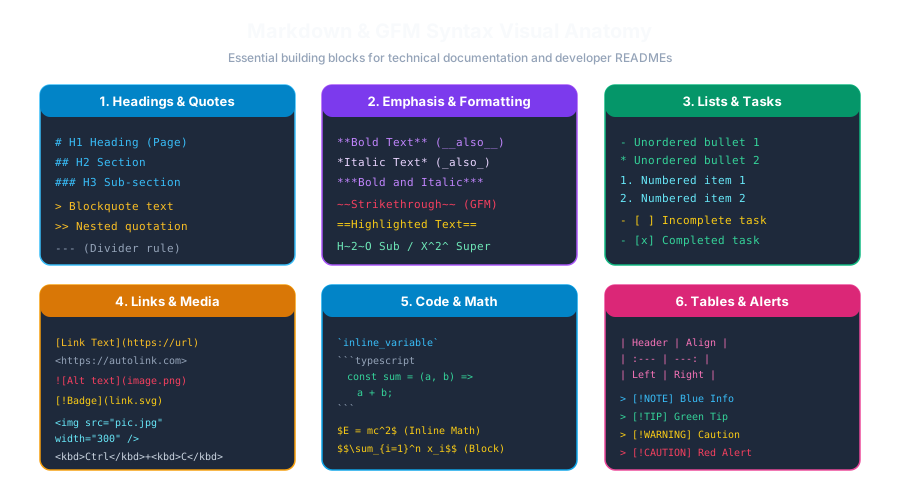
Markdown Syntax AnatomyClick to Zoom
Markdown Syntax Anatomy

1. Basic Blockquote Syntax

To create a blockquote, prefix the line with a greater-than symbol (>), followed by an optional space:

Markdown
> "Simplicity is prerequisite for reliability."
> — Edsger W. Dijkstra

Rendered Output:

"Simplicity is prerequisite for reliability." — Edsger W. Dijkstra

You do not need to prefix every single wrapped line with > (lazy blockquotes work), but doing so makes the raw markdown much cleaner and easier to edit.


2. Multi-Paragraph Blockquotes

To include multiple paragraphs inside a single blockquote, place a > on the empty blank lines between the paragraphs:

Markdown
> First paragraph of the quoted statement.
>
> Second paragraph continuing the author's explanation.

3. Nested Blockquotes (Quotes within Quotes)

You can nest blockquotes within each other by adding additional > symbols:

Markdown
> Primary external quote block.
>
>> This is a nested quotation inside the parent quote.
>> It renders with an additional indentation level.
>
> Back to the primary quote block.

4. Rich Formatting Inside Blockquotes

Blockquotes are containers that can host other Markdown elements, including headings, lists, bold text, and code blocks:

Markdown
> ### 💡 Pro Tip
> Always run automated tests before deploying to production:
> 1. Unit tests (`npm test`)
> 2. End-to-end integration tests
>
> *Failure to test leads to production downtime!*

Multiple Choice Questions

1. Which symbol is used to create a blockquote in Markdown?

A. Hash (#) B. Greater-than symbol (>) C. Exclamation mark (!) D. Colon (:) Answer: B Explanation: The greater-than character (>) at the start of a line compiles to an HTML <blockquote> element.


2. How do you create a nested blockquote inside another quote?

A. Use double greater-than symbols (>>) B. Use a plus sign (+) C. Type <quote><quote> D. Indent with 10 spaces Answer: A Explanation: Adding an additional > (e.g. >>) creates a second-level nested blockquote.


3. Which HTML tag is generated by a Markdown blockquote?

A. <pre> B. <blockquote> C. <q> D. <aside> Answer: B Explanation: Markdown blockquotes compile directly to the HTML <blockquote> container element.


4. How do you maintain a single blockquote across multiple paragraphs?

A. Put a > on the blank line between the paragraphs B. Close and reopen the file C. Use a comma D. Blockquotes cannot have multiple paragraphs Answer: A Explanation: Placing a > on the intervening empty line ensures both paragraphs remain inside the same <blockquote> container.


5. Can a blockquote contain other markdown elements such as headings and bulleted lists?

A. No, only plain unformatted text is allowed B. Yes, blockquotes can host headings, lists, bold text, and code snippets C. Only if written in Japanese D. Only on Mac computers Answer: B Explanation: Blockquotes are container blocks in Markdown that can hold headings, lists, emphasis, and code blocks.


Next Lesson

Unordered Lists & Bullet Customization

Continue learning with hands-on practice, examples, and exercises in the upcoming topic.

Practice Quiz

Test your understanding of this lesson with 5 questions. Each question has one correct answer.

PrevNext