Text Emphasis: Bold, Italic, Strikethrough & Highlights0%

Text Emphasis: Bold, Italic, Strikethrough & Highlights

Beginner12 min readUpdated: Jul 11, 2026
Study Materials

Emphasis styling allows you to highlight key terms, indicate deletions, or call attention to critical instructions. Markdown provides clean symbols that map directly to semantic HTML formatting tags.
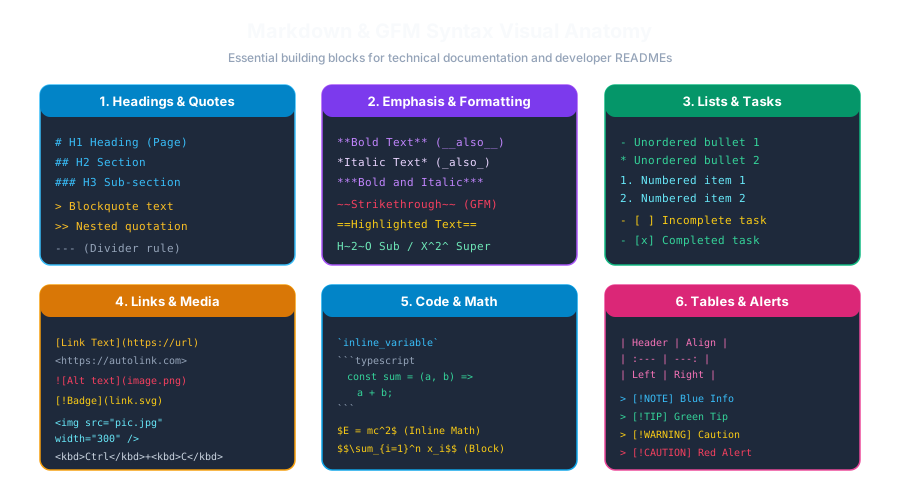
Markdown Syntax AnatomyClick to Zoom
Markdown Syntax Anatomy

1. Bold Text (Strong Emphasis / <strong>)

To make text bold, surround it with two asterisks (`)** or **two underscores (__`)**:

Markdown
This is **very important** information.
This is __also bold__ text.
  • HTML Output: <strong>very important</strong>
  • Best Practice: Prefer double asterisks (**) because underscores inside words (like user_profile_name) can occasionally cause ambiguity in some parsers.

2. Italic Text (Emphasis / <em>)

To italicize text, surround it with a *single asterisk (`)** or **single underscore (_`)**:

Markdown
This is *italicized* text.
This is _also italicized_ text.
  • HTML Output: <em>italicized</em>

3. Combining Bold and Italic (Bold-Italic)

To make text simultaneously bold and italic, surround it with three asterisks (``)*:

Markdown
This is ***critically important and emphasized***.
  • HTML Output: <strong><em>critically important and emphasized</em></strong>

4. Strikethrough (GFM Extension / <del>)

In GitHub Flavored Markdown, surround text with double tildes (~~) to show crossed-out or deprecated content:

Markdown
~~Deprecated: Use API v1~~
Now use API v2 for all new requests.
  • Rendered Output: <del>Deprecated: Use API v1</del>
  • HTML Output: <del>Deprecated: Use API v1</del>

5. Highlights, Subscripts & Superscripts (Extended Markdown)

In extended flavors like Markdown Extra, Obsidian, and Pandoc:

StyleSyntaxExampleUse Case
Highlight==text====Crucial concept==Study notes & revision
Subscript~text~H~2~OChemical formulas ($H_2O$)
Superscript^text^X^2^ + Y^2^Math exponents ($X^2$)

Multiple Choice Questions

1. What syntax is used to create bold text in standard Markdown?

A. bold B. bold C. ~bold~ D. #bold# Answer: B Explanation: Surrounding text with double asterisks (e.g. bold) renders bold text corresponding to the HTML <strong> element.


2. Which HTML element is typically generated when you apply single asterisks (italic) in Markdown?

A. <b> B. <em> C. <mark> D. <small> Answer: B Explanation: Single asterisks map semantically to the HTML <em> (emphasis) element.


3. How do you apply both bold and italic formatting simultaneously to a word?

A. Surround with three asterisks (*word) B. Surround with four hashes (####word####) C. Use brackets ([word]) D. Repeat the word twice Answer: A Explanation:* Three asterisks combine bold (2) and italic (1) to generate <strong><em>word</em></strong>.


4. What is the GFM syntax for strikethrough text?

A. --text-- B. text C. text D. __text__ Answer: B Explanation: Double tildes (text) are used in GitHub Flavored Markdown to render strikethrough text.


5. Why is 'bold' generally preferred over '__bold__' by technical writers?

A. Asterisks render in red color B. Underscores can clash with variable names containing underscores (such as snake_case_variables) C. Asterisks compile 10 times faster D. Underscores are not allowed on the internet Answer: B Explanation: Using asterisks prevents parsing conflicts when dealing with snake_case programming identifiers and file paths.


Next Lesson

Blockquotes, Nested Quotes & Callouts

Continue learning with hands-on practice, examples, and exercises in the upcoming topic.

Practice Quiz

Test your understanding of this lesson with 5 questions. Each question has one correct answer.

PrevNext