MSK Institute • Shikohabad
Loading Page Content...
Preparing courses, live labs, and learning resources.सामग्री लोड हो रही है, कृपया प्रतीक्षा करें...
Connecting serverPlease wait...
💻 Practical Labs🚀 Free Demo📜 Verified Certificates
Preparing courses, live labs, and learning resources.सामग्री लोड हो रही है, कृपया प्रतीक्षा करें...
Lists are indispensable for organizing information, outlining features, and enumerating project requirements. In Markdown, unordered lists represent bulleted collections where the sequence does not imply a chronological order.
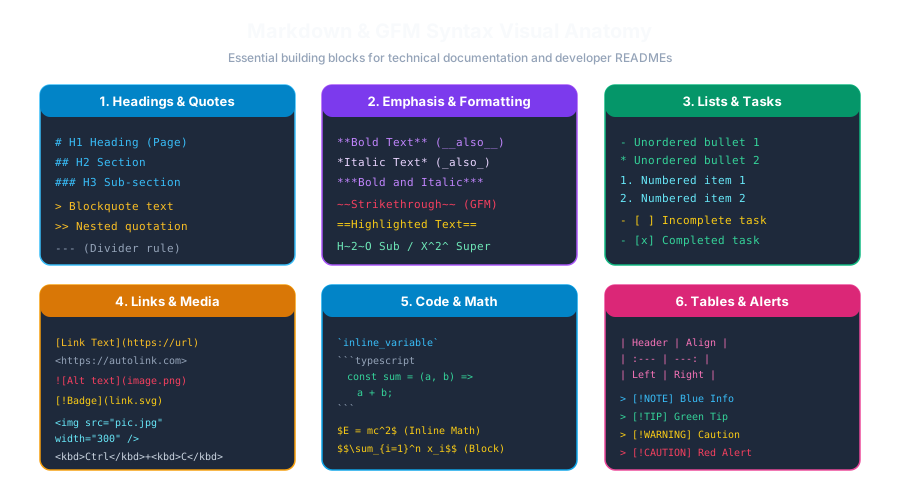 Click to Zoom
You can create an unordered bullet item using any of three characters: dash (-), *asterisk (`)**, or **plus (+`)**, followed by a space:
All three symbols compile to the identical HTML <ul><li>...</li></ul> structure.
-) for consistency.To nest a sub-list inside an existing list item, indent the sub-items by 2 or 4 spaces (or 1 Tab):
Understanding the difference between tight and loose lists is a mark of an experienced Markdown writer:
When items have no blank lines between them, the HTML compiles without <p> tags inside the <li>:
HTML: <li>Clean item 1</li>
If you insert a blank line between any items in the list, the entire list becomes "loose", wrapping each item in <p> tags with extra paragraph margins:
HTML: <li><p>Detailed item 1 with extensive explanation.</p></li>
Continue learning with hands-on practice, examples, and exercises in the upcoming topic.
| Previous Lesson | Next Lesson |
|---|---|
| Blockquotes, Nested Quotes & Callouts | Ordered Lists & Nested Outlines |
Test your understanding of this lesson with 5 questions. Each question has one correct answer.