Introduction to Markdown & Philosophy0%

Introduction to Markdown & Philosophy

Beginner12 min readUpdated: Jul 11, 2026
Study Materials

In the modern software industry, nearly all developer documentation, GitHub project descriptions, technical blogs, and team wikis are written in Markdown. Whether you are drafting a README.md for an open-source library or taking notes in Obsidian, Markdown is the universal standard for formatting plain text into clean, structured documents.
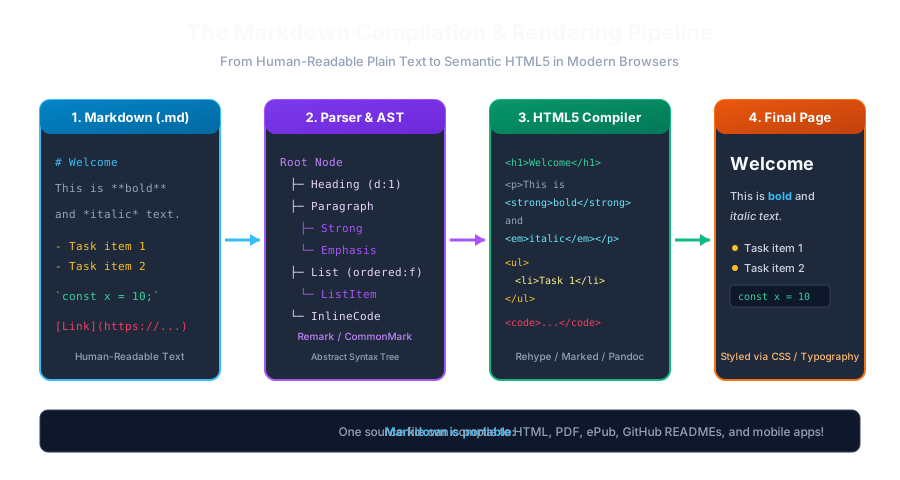
Markdown Compilation & Rendering PipelineClick to Zoom
Markdown Compilation & Rendering Pipeline

1. What is Markdown?

Markdown is a lightweight markup language created in 2004 by John Gruber in collaboration with Aaron Swartz. It allows writers and programmers to format text using a clean, human-readable plain-text syntax that can easily be converted into semantically valid HTML5, PDF, or eBook formats.

  • File Extension: Markdown files typically use the .md or .markdown extension.
  • MIME Type: text/markdown (standardized in RFC 7763).

2. The Core Philosophy of Markdown

The defining principle behind Markdown is readability:

"The overriding design goal for Markdown's formatting syntax is to make it as readable as possible. A Markdown-formatted document should be publishable as-is, as plain text, without looking like it's been marked up with tags or formatting instructions." — John Gruber, Markdown Creator

Compare how a heading and bold text look in HTML versus Markdown:

Raw HTML (Cluttered)Raw Markdown (Readable Plain Text)
<h1>Getting Started</h1># Getting Started
<p>Please <strong>read</strong> this.</p>Please **read** this.
<a href="https://example.com">Visit</a>[Visit](https://example.com)

Even if you open a Markdown file in a simple command-line editor like nano or notepad, the document is completely natural to read without mental translation of closing tags.


3. How Markdown Works (The Compilation Pipeline)

Markdown is not compiled by the browser directly; rather, it passes through a parsing pipeline:

  1. 1
    Source Text (.md): The author writes plain text with lightweight symbols (#, *, -, >).
  2. 2
    Lexer & Parser: A Markdown parser (like Remark, Marked, or CommonMark) parses the characters into an Abstract Syntax Tree (AST).
  3. 3
    HTML Generator: The AST is transformed into clean, standards-compliant HTML elements (<h1>, <p>, <ul>, <code>).
  4. 4
    Browser Rendering: The browser renders the HTML and applies CSS styles to produce a beautiful, responsive layout.
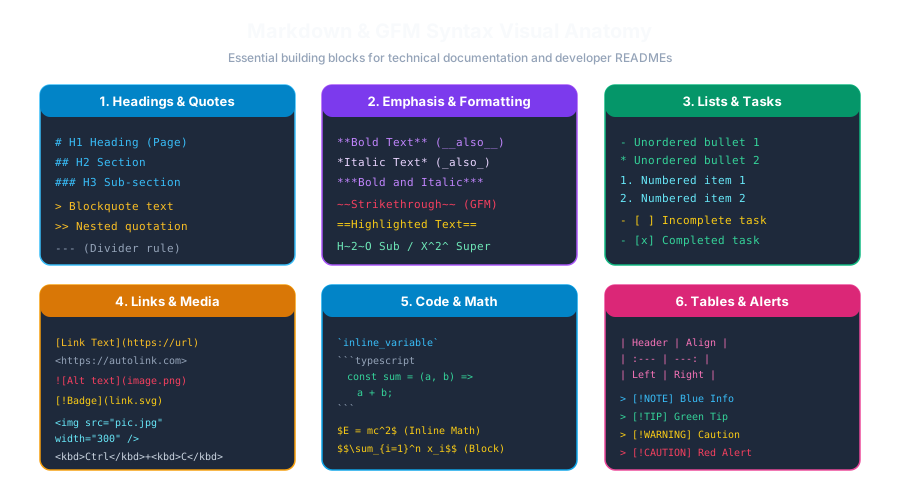
Markdown Syntax AnatomyClick to Zoom
Markdown Syntax Anatomy

4. Where is Markdown Used in Real-World Tech?

  • GitHub & GitLab: Every repository's homepage is driven by README.md. Issues, pull requests, and wiki pages all use Markdown.
  • Modern Static Site Generators: Tools like Next.js Contentlayer, Astro, Docusaurus, and MkDocs render complete documentation websites from markdown files.
  • Note-taking & Knowledge Bases: Popular apps like Obsidian, Notion, Logseq, and Joplin use Markdown for future-proof, vendor-lock-in-free personal knowledge management.
  • Chat & Team Tools: Slack, Discord, Microsoft Teams, and ChatGPT responses all interpret markdown syntax for formatting messages.

Multiple Choice Questions

1. Who created Markdown in 2004 alongside Aaron Swartz?

A. Tim Berners-Lee B. John Gruber C. Brendan Eich D. Linus Torvalds Answer: B Explanation: John Gruber created Markdown in 2004 with contributions from Aaron Swartz, aiming to build an easy-to-read, easy-to-write plain text formatting syntax.


2. What is the standard file extension used for Markdown documents?

A. .mk B. .txt C. .md D. .mdownx Answer: C Explanation: While .markdown is sometimes used, .md is the universally recognized and most widely adopted file extension for Markdown files.


3. What is the primary design philosophy behind Markdown syntax?

A. To execute code in the browser directly B. To be readable as-is in plain text without looking like code or markup tags C. To replace SQL database queries D. To compress image files on servers Answer: B Explanation: Markdown was designed so that the raw source text is pleasant and intuitive to read without visual distraction from tags.


4. How does a web browser display a Markdown file to the end user?

A. The browser native engine runs Markdown directly without translation B. A parser converts Markdown source into an Abstract Syntax Tree (AST) and compiles it into HTML C. The browser converts Markdown to binary machine code D. Markdown is printed onto paper first Answer: B Explanation: Browsers only understand HTML, CSS, and JavaScript; hence, a Markdown parser compiles the text into HTML elements that the browser then renders.


5. Which of the following software platforms uses Markdown for repository documentation and pull requests?

A. Adobe Premiere Pro B. GitHub C. Microsoft Excel D. AutoCAD Answer: B Explanation: GitHub relies fundamentally on Markdown for README files, issue discussions, pull requests, and project documentation.


Next Lesson

Markdown Flavors & Specifications (CommonMark vs GFM)

Continue learning with hands-on practice, examples, and exercises in the upcoming topic.

Related Lessons

Practice Quiz

Test your understanding of this lesson with 5 questions. Each question has one correct answer.

Next