MSK Institute • Shikohabad
Loading Page Content...
Preparing courses, live labs, and learning resources.सामग्री लोड हो रही है, कृपया प्रतीक्षा करें...
Connecting serverPlease wait...
💻 Practical Labs🚀 Free Demo📜 Verified Certificates
Preparing courses, live labs, and learning resources.सामग्री लोड हो रही है, कृपया प्रतीक्षा करें...
Headings establish the structural backbone of any document. They guide search engine crawlers (SEO), create clickable navigation outlines, and allow screen readers to parse the document hierarchy.
In Markdown, there are two distinct ways to create headings: ATX Style (using hash # symbols) and Setext Style (using underlines).
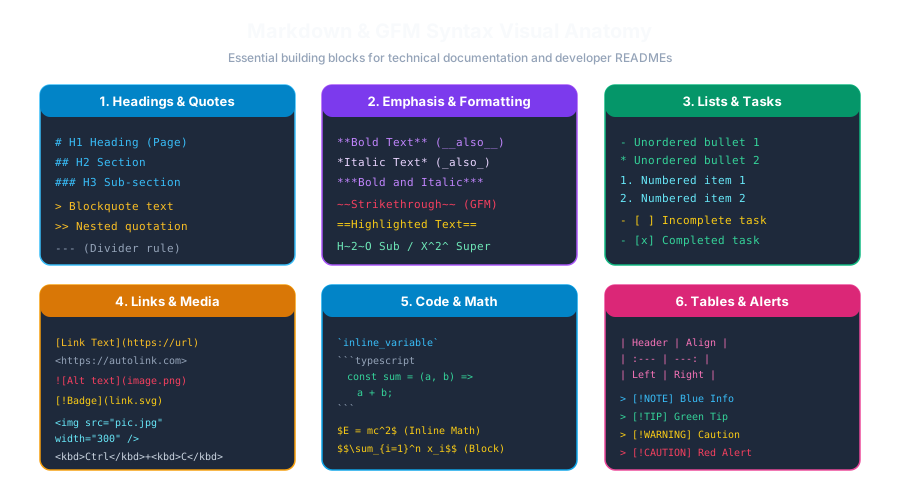 Click to Zoom
ATX style headings are the most popular and versatile syntax in Markdown. You simply prefix the line with 1 to 6 hash symbols (#), followed by a space:
# and the heading text!
- Correct: # Heading Title
- Incorrect: #HeadingTitle (Many modern CommonMark parsers will treat this as a hashtag or plain text rather than a heading!)You can optionally close an ATX heading with matching hashes. The closing hashes are purely aesthetic and will not appear in the rendered output:
Setext (Structure Enhanced Text) is an older style that mimics ASCII email conventions by underlining text with equal signs (=) or hyphens (-):
=): Produce an <h1> tag.-): Produce an <h2> tag.=== or ---) is sufficient.<h1> and <h2>). It cannot create <h3> through <h6>.# Heading 1 as the title of your article or README. Use ## Heading 2 for main chapters, and ### Heading 3 for subtopics.# H1 to an ### H3 without an intermediate ## H2. Skipping levels breaks accessibility for screen-reader users.#heading-slug) and sidebar Table of Contents.Continue learning with hands-on practice, examples, and exercises in the upcoming topic.
| Previous Lesson | Next Lesson |
|---|---|
| Environment & Editor Setup (VS Code, Obsidian, Typora) | Paragraphs, Line Breaks & Horizontal Rules |
Test your understanding of this lesson with 5 questions. Each question has one correct answer.