Paragraphs, Line Breaks & Horizontal Rules0%

Paragraphs, Line Breaks & Horizontal Rules

Beginner12 min readUpdated: Jul 11, 2026
Study Materials

Controlling whitespace, paragraph divisions, and line breaks in Markdown behaves differently from traditional word processors like Microsoft Word. Understanding these rules avoids the common beginner frustration of text running together onto a single line.
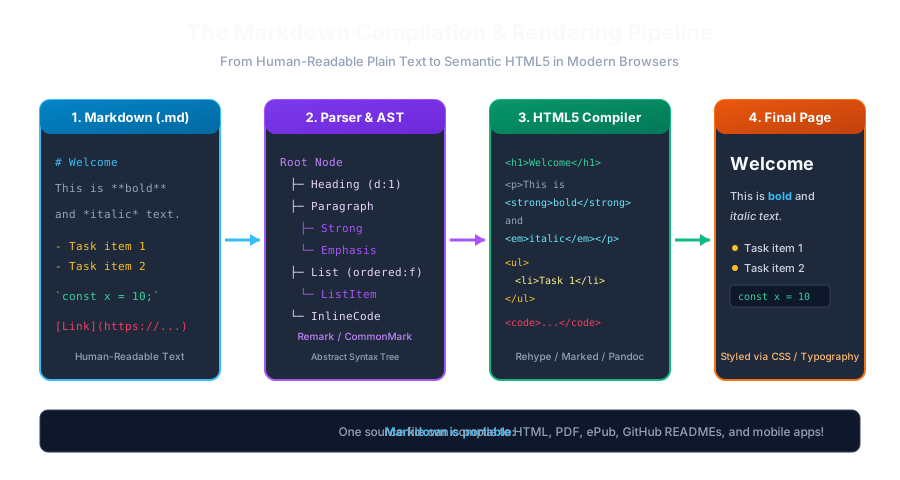
Markdown Compilation PipelineClick to Zoom
Markdown Compilation Pipeline

1. Creating Paragraphs

In Markdown, a paragraph is simply one or more consecutive lines of text. To start a new paragraph, you must leave one or more blank lines between the text blocks:

Markdown
This is the first paragraph. It contains complete sentences that describe the overview.
 
This is the second paragraph. Because of the blank line above, it renders as a distinct <p> block in HTML.

If you do not leave a blank line and simply press Enter once:

Markdown
Line one
Line two

Rendered Output: Both lines will merge together into a single continuous sentence: "Line one Line two".


2. Creating Hard Line Breaks (<br>)

Sometimes you want a line break without creating a whole new paragraph (for example, in poetry, street addresses, or song lyrics).

There are two primary ways to force a line break in Markdown:

Method A: Two Trailing Spaces (Traditional Markdown)

Add two or more spaces at the very end of the line, then press Enter:

Markdown
123 Tech Park Road··[Enter]
Block B, Suite 400··[Enter]
New Delhi, India

(The dots ·· represent two spaces).

Method B: Raw <br> Tag (Universal & Explicit)

Because trailing spaces are invisible in text editors and often get stripped by code linters, you can use the HTML5 <br /> tag directly:

Markdown
123 Tech Park Road<br />
Block B, Suite 400<br />
New Delhi, India

3. Horizontal Rules (Thematic Breaks / Dividers)

A horizontal rule creates a visual dividing line (<hr /> in HTML) that separates major themes or sections in a document.

You can create a horizontal rule by placing *three or more hyphens (-), asterisks (`), or underscores (_`)** on a line by themselves:

Markdown
---
 
***
 
___
Pro Tip
Pro Tip (Avoid Confusion with Setext H2): Always leave a blank line before --- so the parser does not accidentally interpret it as an underline for the preceding text!
Markdown
<!-- Correct Horizontal Rule -->
This is a paragraph.
 
---
 
<!-- Dangerous! Might render as an H2 Heading -->
This is a paragraph.
---

Multiple Choice Questions

1. In standard Markdown, how do you separate two distinct paragraphs?

A. By typing </p> at the end of each sentence B. By leaving one or more blank lines between the text blocks C. By pressing Spacebar 10 times D. By inserting a dollar sign ($) Answer: B Explanation: Markdown requires an empty blank line between blocks of text to generate separate <p> paragraph elements.


2. What happens if you press 'Enter' only once between two lines of text without trailing spaces?

A. The second line is deleted B. The lines are merged together into a single continuous paragraph line C. An H1 heading is created automatically D. The file is saved as a PDF Answer: B Explanation: Markdown ignores single soft line breaks in standard CommonMark, collapsing them into a single space in the rendered paragraph.


3. Which of the following correctly creates a hard line break (<br>) in standard Markdown?

A. Two or more spaces at the end of the line, followed by Enter B. Double hash symbols (##) C. An exclamation mark (!) D. A semicolon (;) Answer: A Explanation: Ending a line with two or more spaces before pressing Enter forces a hard line break (<br>) in Markdown.


4. Which HTML tag is generated by typing '---' on a line by itself?

A. <br> B. <hr> C. <div> D. <header> Answer: B Explanation: Three or more hyphens, asterisks, or underscores on an isolated line compile to an HTML <hr> (horizontal rule) thematic break.


5. Why is using '<br />' often preferred over two trailing spaces in modern software teams?

A. HTML tags run faster in Chrome B. Invisible trailing spaces are often automatically removed by code formatters like Prettier or editor auto-trim settings C. Two spaces take up too much memory D. CommonMark banned the spacebar Answer: B Explanation: Many IDEs and formatters strip trailing whitespace on file save, making explicit <br /> tags more reliable for team collaboration.


Next Lesson

Text Emphasis: Bold, Italic, Strikethrough & Highlights

Continue learning with hands-on practice, examples, and exercises in the upcoming topic.

Practice Quiz

Test your understanding of this lesson with 5 questions. Each question has one correct answer.

PrevNext