MSK Institute • Shikohabad
Loading Page Content...
Preparing courses, live labs, and learning resources.सामग्री लोड हो रही है, कृपया प्रतीक्षा करें...
Connecting serverPlease wait...
💻 Practical Labs🚀 Free Demo📜 Verified Certificates
Preparing courses, live labs, and learning resources.सामग्री लोड हो रही है, कृपया प्रतीक्षा करें...
A Word Processor is an application software used for creating, editing, formatting, styling, and printing text documents—such as official office letters, resumes (बायोडाटा), applications, reports, and notices.
In the NIELIT CCC exam, questions are asked on both LibreOffice Writer (Free & Open Source) and Microsoft Word.
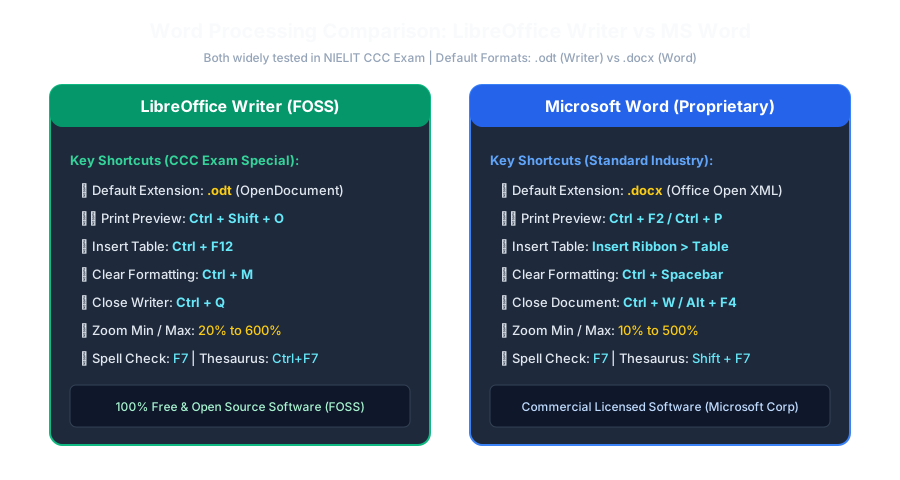 Click to Zoom
When you launch LibreOffice Writer or MS Word, the screen is organized into several standard interface bars:
Untitled 1 - LibreOffice Writer or Document1 - Word) and the three window control buttons (-, □, ✕).Ctrl+N), Open (Ctrl+O), Save (Ctrl+S), Print (Ctrl+P), Cut, Copy, Paste.Ctrl+B), Italic (Ctrl+I), Underline (Ctrl+U), Font Color, Text Alignments.| Parameter | LibreOffice Writer (लिब्रेऑफिस राइटर) | Microsoft Word (एमएस वर्ड) |
|---|---|---|
| Default File Extension | .odt (OpenDocument Text) | .docx (Office Open XML) |
| Default Filename | Untitled 1 | Document 1 |
| Minimum Zoom Level | 20% | 10% |
| Maximum Zoom Level | 600% | 500% |
| Close Window Shortcut | Ctrl + Q (Exit Writer) / Ctrl + W | Ctrl + W / Alt + F4 |
Continue learning with hands-on practice, examples, and exercises in the upcoming topic.
| Previous Lesson | Next Lesson |
|---|---|
| Common File Extensions | Creating, Opening, Saving, and Printing Documents |
Test your understanding of this lesson with 5 questions. Each question has one correct answer.