Tables & Column Alignment Syntax0%

Tables & Column Alignment Syntax

Beginner12 min readUpdated: Jul 11, 2026
Study Materials

Tables are indispensable for summarizing product features, comparing technical specifications, displaying benchmarks, and documenting API parameters. While original Markdown omitted tables, GitHub Flavored Markdown (GFM) established the universal pipe-and-hyphen table standard.
Markdown Table Alignment RulesClick to Zoom
Markdown Table Alignment Rules

1. The Anatomy of a GFM Table

A GFM table consists of three distinct components:

  1. 1
    Header Row: Defines column labels separated by pipes (|).
  2. 2
    Separator / Divider Row: A line of hyphens (---) and colons that defines column boundaries and text alignment.
  3. 3
    Data Rows: Rows of content separated by pipes.
Markdown
| Method | Endpoint | Description |
| :--- | :--- | :--- |
| GET | /api/users | Fetch all registered users |
| POST | /api/users | Create a new user profile |
| DELETE | /api/users/:id | Remove user by unique ID |

2. Column Alignment Syntax (The Colon Rules)

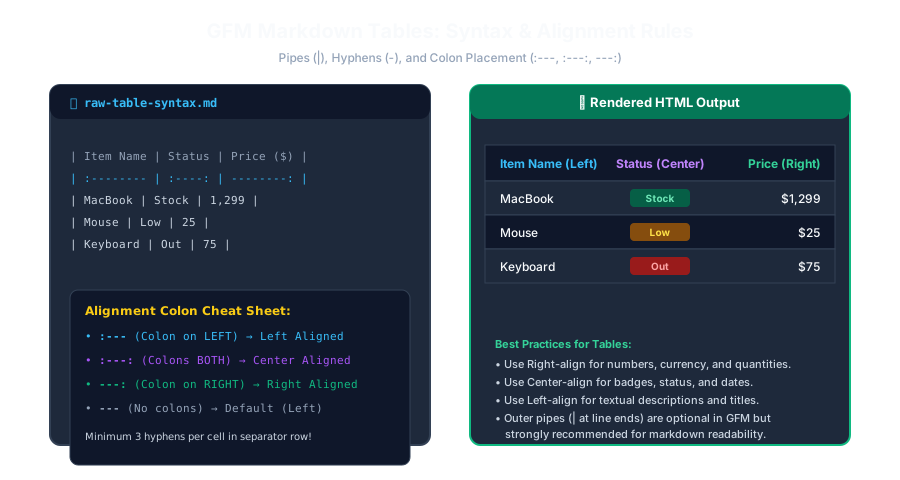
The placement of colons (:) inside the second divider row controls how the entire column is aligned:

Syntax in SeparatorAlignment DirectionBest Used For
:---Left-Aligned (Default)General text, names, descriptions, titles
:---:Center-AlignedStatus badges, short codes, dates, yes/no flags
---:Right-AlignedNumbers, prices, quantities, file sizes
Markdown
| Product (Left) | Stock (Center) | Price (Right) |
| :------------- | :------------: | ------------: |
| Laptop | In Stock | $1,200 |
| Wireless Mouse | Low | $25 |
Markdown Syntax AnatomyClick to Zoom
Markdown Syntax Anatomy

3. Formatting Text Inside Table Cells

You can use most inline Markdown elements inside table cells:

  • Bold / Italic: | **Bold** | *Italic* |
  • Inline Code: | const x = 10; | File path |
  • Hyperlinks & Badges: | [Documentation](https://...) | ![Badge](...) |
  • Line Breaks inside a cell: Use raw <br /> tags (pressing Enter will create a new row!).
How to Include a Literal Pipe (|) in Cell Data? If your code or text contains a pipe (like a TypeScript union or bitwise OR), escape it with a backslash: \|! Example: | Type | string \| number |

Multiple Choice Questions

1. Which character is used to separate columns in a GitHub Flavored Markdown table?

A. Slash (/) B. Pipe (|) C. Ampersand (&) D. Tilde (~) Answer: B Explanation: The pipe character (|) acts as the column boundary delimiter in GFM tables.


2. How do you right-align a column in a Markdown table?

A. Place a colon on the right side of the separator row: '---:' B. Type 'align=right' C. Press Spacebar 20 times D. Use double pipes (||) Answer: A Explanation: Placing a colon on the right side of the hyphen separator (---:) aligns all content in that column to the right.


3. What is the minimum number of hyphens required per cell in the table separator row?

A. 1 hyphen B. 3 hyphens (e.g. '---') C. 10 hyphens D. 50 hyphens Answer: B Explanation: CommonMark and GFM specifications require at least three hyphens in each cell of the delimiter row.


4. How do you insert a line break inside a single table cell without breaking the row?

A. Press Enter B. Use an HTML '<br />' tag C. Type \newline D. Tables do not allow line breaks Answer: B Explanation: Pressing Enter begins a new table row, so an explicit HTML <br /> tag must be used for intra-cell line breaks.


5. How do you include a literal pipe character ('|') inside a table cell without splitting the column?

A. Escape it with a backslash: '\|' B. Write the word 'pipe' C. Close the table D. Use a comma Answer: A Explanation: A backslash before the pipe (\|) prevents the parser from treating it as a column delimiter.


Next Lesson

Footnotes & Citation References

Continue learning with hands-on practice, examples, and exercises in the upcoming topic.

Practice Quiz

Test your understanding of this lesson with 5 questions. Each question has one correct answer.

PrevNext