When writing comprehensive research papers, technical documentation, or historical overviews, citing sources and adding supplementary notes without disrupting the narrative flow is essential. In GitHub Flavored Markdown and extended specifications, Footnotes provide automated, bi-directional linking.
Click to Zoom
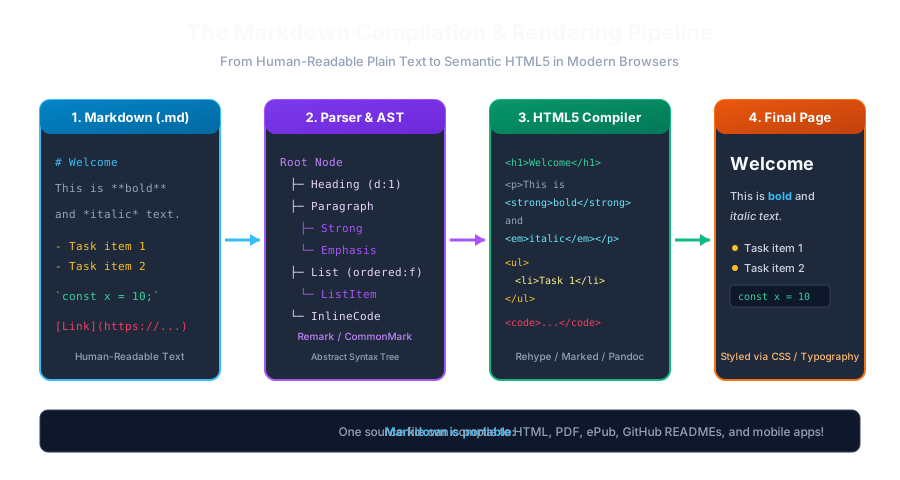
Markdown Compilation Pipeline
1. Footnote Syntax
Footnotes consist of two connected parts:
1
The Footnote Reference: Inserted inline where you want the small superscript citation number to appear.
2
The Footnote Definition: Placed anywhere in the document (typically at the very bottom) providing the detailed reference text.
1Markdown was originally developed in 2004[^1] by John Gruber with input from Aaron Swartz[^2].
2
3<!-- Footnote Definitions (usually placed at bottom of page) -->
5[^2]: Swartz, Aaron. "Aaron Swartz: The Web's Prodigy." The New Yorker, 2013.
2. How Footnotes Render in the Browser
When compiled to HTML:
The inline reference [^1] renders as a small, superscript clickable number: <sup><a href="#fn-1">1</a></sup>.
All footnote definitions are automatically gathered, sorted, and rendered at the very bottom of the page in an ordered list with back-to-top return arrows (↩).
Clicking the footnote number jumps the user to the definition at the bottom; clicking the return arrow jumps back to where they left off in the text!
3. Named Footnote Identifiers
Footnote identifiers do not have to be numbers! You can use descriptive alphanumeric words:
1According to the official RFC standard[^rfc], Markdown MIME type is text/markdown.
2
3[^rfc]: RFC 7763: The text/markdown Media Type, IETF (2016).
(The browser will still automatically renumber them consecutively as 1, 2, 3 in the rendered document!)
4. Multi-Paragraph Footnotes
To include multiple paragraphs or code snippets inside a single footnote definition, indent the subsequent lines by 4 spaces:
1Here is a complex technical citation[^detailed].
2
3[^detailed]: First paragraph explaining the historical context.
4
5 Second paragraph providing reproduction steps.
git log --oneline
1
Interactive Quiz• Knowledge Check
Multiple Choice Questions
Question 1
What syntax is used to insert a footnote reference in GFM Markdown?
Question 2
Where do footnote definitions typically appear in the rendered HTML output?
Question 3
What happens if you use non-numeric names like '[^rfc]' for footnote identifiers?
Question 4
How do you add a second paragraph inside a single footnote definition?
Question 5
What interactive feature do compiled GFM footnotes provide?
Next Lesson
GitHub Alerts & Admonitions
Continue learning with hands-on practice, examples, and exercises in the upcoming topic.
 Click to Zoom