MSK Institute • Shikohabad
Loading Page Content...
Preparing courses, live labs, and learning resources.सामग्री लोड हो रही है, कृपया प्रतीक्षा करें...
Connecting serverPlease wait...
💻 Practical Labs🚀 Free Demo📜 Verified Certificates
Preparing courses, live labs, and learning resources.सामग्री लोड हो रही है, कृपया प्रतीक्षा करें...
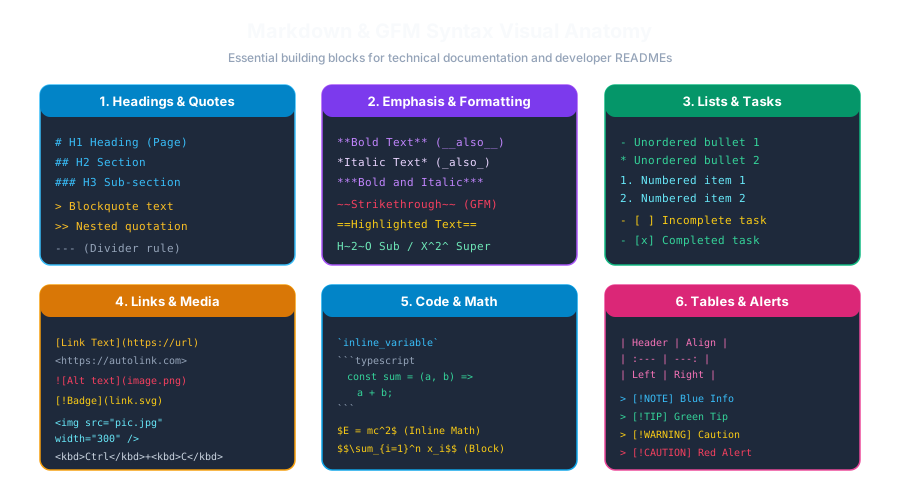
When writing documentation, software manuals, or installation guides, certain pieces of information require immediate visual distinction—such as a critical security warning, a helpful tip, or a breaking change alert. In late 2023, GitHub officially introduced standardized Markdown Alerts (Admonitions).
 Click to Zoom
GitHub alerts extend standard blockquote syntax by placing an alert identifier in square brackets ([!TYPE]) on the very first line:
Each alert type renders with a distinct theme, accent border, and leading SVG icon:
| Alert Syntax | Accent Color | Visual Theme & Icon | Typical Real-World Use Case |
|---|---|---|---|
> [!NOTE] | Blue | ℹ️ Information Circle | Explaining backward compatibility, historical context |
> [!TIP] | Green | 💡 Lightbulb | Keyboard shortcuts, performance optimizations |
> [!IMPORTANT] | Purple | ❗ Exclamation Diamond | Prerequisite software versions (e.g., Node.js 18+ required) |
> [!WARNING] | Amber/Orange | ⚠️ Warning Triangle | Deprecated API endpoints, migration deadlines |
> [!CAUTION] | Red | 🛑 Octagon Stop | rm -rf commands, dropping production databases |
To ensure alerts render properly across GitHub, GitLab, and modern SSGs:
[!NOTE] (not [!note]).[!TYPE] token must appear on the very first line of the blockquote immediately following the > marker.> marker.npm install'?Continue learning with hands-on practice, examples, and exercises in the upcoming topic.
| Previous Lesson | Next Lesson |
|---|---|
| Footnotes & Citation References | Mermaid.js Diagrams in Markdown |
Test your understanding of this lesson with 5 questions. Each question has one correct answer.