Social networking platforms like Facebook, Instagram, LinkedIn, and WhatsApp connect billions of people worldwide. However, sharing excessive personal information online makes individuals vulnerable to identity theft, cyberstalking, and online fraud. In Hindi, hum kehte hain "Social media par savdhani aur mazboot password ki suraksha".
Click to Zoom
Cyber Security
1. Anatomy of a Strong Password
A weak password is like leaving your front door unlocked. Hackers use automated dictionary attacks and brute-force software that can crack simple passwords (like 123456, password, or rahul@123) in mere seconds!
Different passwords for Bank, Email, and Instagram
Single password for every website
Pro Tip
Pro Tip (Passphrase Method): Instead of one complex word, combine 3-4 unrelated words into a sentence that you can remember: BlueMango#Dancing99!.
2. Two-Factor Authentication (2FA / MFA)
Even if a website suffers a massive data breach and your password is exposed online, Two-Factor Authentication (2FA) prevents anyone from accessing your account without your physical mobile phone.
Factor 1 (Something You Know): Your username and secret password.
Factor 2 (Something You Have or Are): An SMS OTP, an Authenticator App code (Google Authenticator), or fingerprint/Face ID biometric scan.
Always enable 2FA on WhatsApp (Two-Step Verification PIN), Instagram, Facebook, Gmail, and banking apps!
3. Safe Practices on Social Media Platforms
1
Set Account Privacy to Private:
Keep your profile visibility set to "Friends Only" or "Private Account" instead of "Public". This prevents strangers from downloading your photos or tracking your family members.
1
Never Overshare Sensitive Details:
Avoid posting your live location, boarding passes, flight tickets, home address, phone number, or Aadhaar details. Criminals use boarding pass barcodes to extract personal travel records.
1
Beware of Social Engineering & Impersonation:
Hackers often create duplicate fake profiles using your friend's photo and send messages like: "Urgent medical emergency, please send ₹5,000 via UPI immediately!".
Rule: Always call the friend on voice call before sending any money.
1
Avoid Taking Suspicious Quizzes and Third-Party Surveys:
Fun quizzes like "Which celebrity do you look like?" or "What will you look like in 2050?" often request full permissions to access your friend list, private photos, and email address.
Click to Zoom
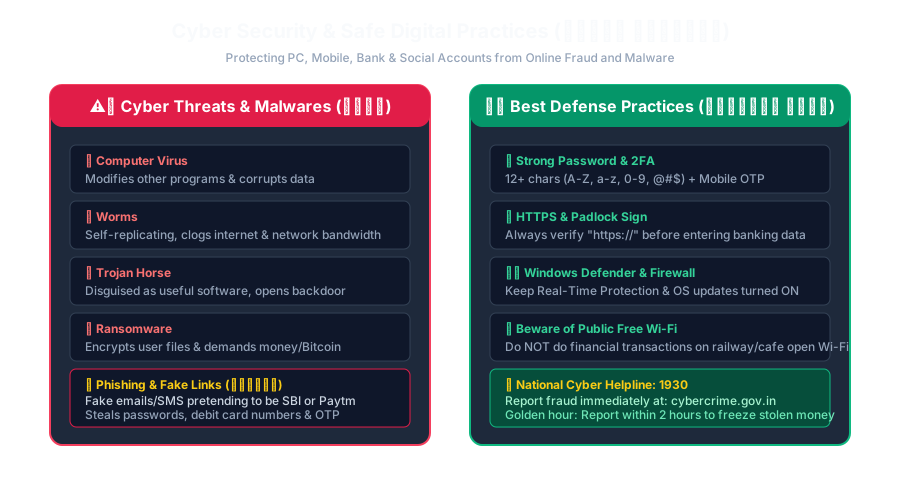
Cyber Security Threats and Safe Practices
4. What to Do If Your Account Is Hacked?
1
Immediately click "Forgot Password" and reset your password using your verified recovery mobile number or email.
2
Navigate to Settings > Security > Active Sessions / Where You're Logged In and click "Log Out of All Devices".
3
Report the hacked account to the social media platform's official Help Center.
4
Inform your friends and contacts immediately so they do not fall for any financial requests sent by the hacker from your profile.
Interactive Quiz• Knowledge Check
Multiple Choice Questions
Question 1
Which of the following represents the strongest and most secure password?
Question 2
What is Two-Step Verification (Two-Factor Authentication)?
Question 3
Why is it dangerous to post photos of your airline boarding pass or train ticket on social media?
Question 4
In WhatsApp, which feature prevents unauthorized re-registration of your phone number on another device?
Question 5
What should you do first if an online friend suddenly messages asking for urgent money transfer via UPI?
Next Lesson
Safe Practices for Mobile Devices
Continue learning with hands-on practice, examples, and exercises in the upcoming topic.
 Click to Zoom
 Click to Zoom