Smartphones (Android and iOS) carry our entire personal and financial lives—banking apps, UPI, personal photos, chats, Digilocker, and biometric data. Protecting your mobile phone from loss, theft, and malicious apps is vital. In Hindi, hum ise kehte hain "Mobile phone aur smartphone ki poori suraksha".
Click to Zoom
Cyber Security
1. Screen Lock & Biometric Protection
Never leave your smartphone unlocked or without security credentials:
1
Strong Screen Lock: Use a 6-digit numeric PIN, complex password, or alphanumeric passcode. Avoid simple 4-digit PINs like 0000 or 1234.
2
Biometrics (Fingerprint & Face Unlock): Convenient and fast. Ensure you do not register unfamiliar fingerprints on your device.
3
Short Screen Timeout: Set your screen to automatically lock after 30 seconds or 1 minute of inactivity so no one can access your phone if left unattended on a desk.
2. App Permissions & Sideloading Dangers
Smartphones are frequently infected through rogue apps downloaded outside official stores:
Best Practice
What to Do
What to Avoid
Download Source
Only install apps from Google Play Store (Android) or Apple App Store (iOS).
Never install third-party .apk files downloaded from Telegram channels, WhatsApp forwards, or shady websites.
Audit Permissions
Check what permissions an app requests. A simple flashlight or calculator app does NOT need access to your Contacts, Camera, SMS, or Location.
Blindly clicking "Allow" on every permission prompt.
SMS Permission Alert
Banking apps use SMS for OTPs. Never grant SMS read permissions to unknown utilities, games, or photo editors.
Permitting untrusted apps to read incoming OTP messages.
Google Play Protect
Keep Google Play Protect turned ON. It automatically scans all installed apps for malware in the background.
Disabling Play Protect to install cracked or modded APKs.
3. Hazards of Public Wi-Fi Networks
Free Wi-Fi at railway stations, bus stands, hotels, and cafes is open and unencrypted:
Man-in-the-Middle (MitM) Attacks: Hackers connected to the same free Wi-Fi can intercept unencrypted data packets transmitted between your mobile phone and the router.
Rogue Hotspots (Evil Twin): Cybercriminals set up fake open Wi-Fi hotspots named "Free_Railway_WiFi" to trick users into connecting, capturing all their traffic.
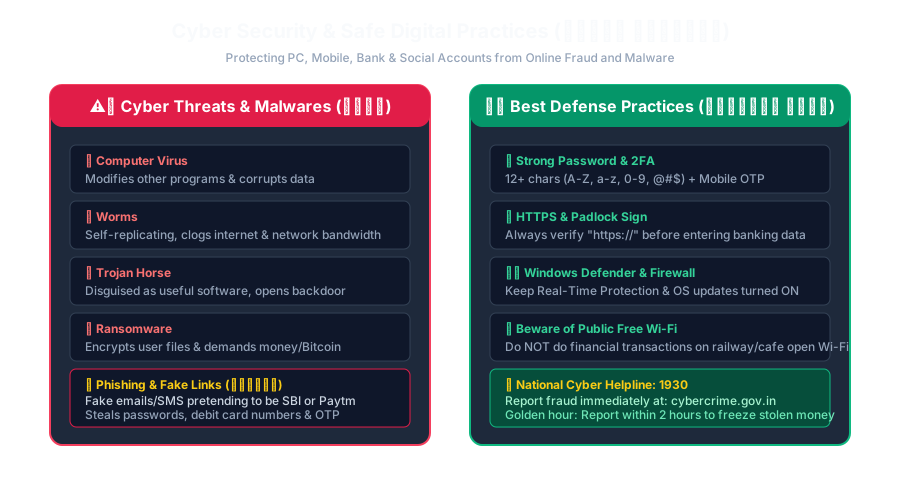
Golden Rule:Never conduct banking transactions, UPI payments, or enter confidential passwords while connected to public open Wi-Fi. Always switch to your personal mobile data (4G/5G).
Click to Zoom
Cyber Security Threats and Safe Practices
4. Lost or Stolen Phone Protection
If your smartphone is lost or stolen, take immediate action to protect your identity and money:
1
Find My Device (Android) / Find My (iPhone):
Allows you to locate your phone on a map, ring it remotely, lock the screen, or perform a Remote Factory Reset (Wipe) to delete all sensitive data.
1
CEIR Portal (Central Equipment Identity Register - Government of India):
Visit the official Indian portal ceir.gov.in to block the unique IMEI number of your stolen phone across all telecom networks in India, rendering the stolen handset completely useless even if the thief inserts a new SIM card.
1
Block SIM Card & UPI Immediately:
Call your telecom operator (Jio, Airtel, Vi, BSNL) to block your SIM card so thieves cannot receive OTPs.
Contact your bank to temporarily freeze internet banking and UPI linked to your mobile number.
Interactive Quiz• Knowledge Check
Multiple Choice Questions
Question 1
Which official Government of India portal allows citizens to track and block lost or stolen mobile phones using their IMEI number?
Question 2
Why should a user avoid conducting financial transactions on free public Wi-Fi at railway stations or cafes?
Question 3
Which built-in Android service continuously scans apps for malicious behavior and security threats?
Question 4
What type of file extension is used to manually install mobile applications on the Android operating system?
Question 5
Why is it dangerous to grant 'SMS' permission to an unknown third-party game or utility app?
Next Lesson
Recognizing Online Fraud and Phishing
Continue learning with hands-on practice, examples, and exercises in the upcoming topic.
 Click to Zoom
 Click to Zoom