Basics of Computer Networks (कंप्यूटर नेटवर्क और टोपोलॉजी)
A Computer Network is an interconnected collection of autonomous computers, servers, printers, and smart devices linked together through cables or wireless signals to share data, files, hardware resources, and internet connections.
Click to Zoom
Network Topologies
1. Classification of Networks by Geographical Scale
In computer networking, networks are categorized based on their geographical coverage area:
Network Type
Full Form
Geographic Coverage
Data Transfer Speed
Real-World Example
PAN
Personal Area Network
Within 10 meters (Single person)
Very Fast
Bluetooth pairing between phone and smartwatch
LAN
Local Area Network
Room, Building, or Campus (up to 1 km)
Very High (100 Mbps - 1 Gbps)
Computer lab at MSK Institute, school office
MAN
Metropolitan Area Network
Across an entire City (5 km to 50 km)
Moderate to High
City cable TV network, municipal traffic cameras
WAN
Wide Area Network
Entire Country, Continent, or the World
Varies
The INTERNET (world's largest WAN), ATM network
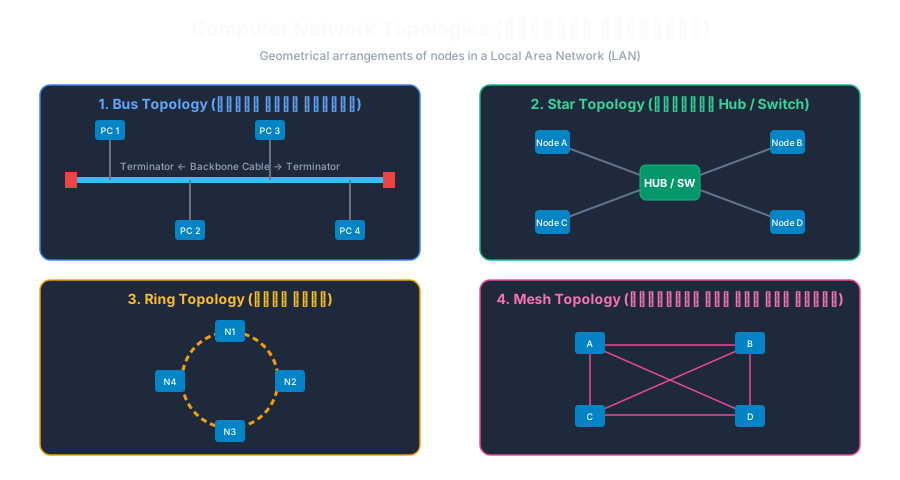
2. Network Topologies (नेटवर्क टोपोलॉजी)
Topology refers to the geometric arrangement or physical layout in which computers (nodes) and cables are connected in a network.
1. Bus Topology (बस टोपोलॉजी)
All computers are connected to a single central communication cable called the Backbone Cable.
Both ends of the cable must have Terminators to prevent signal reflection.
Advantage: Simple and inexpensive to install.
Disadvantage: If the main backbone cable breaks anywhere, the entire network collapses!
2. Star Topology (स्टार टोपोलॉजी - सबसे लोकप्रिय)
Every computer is connected individually to a central connection device called a Hub or Switch.
Advantage: Highly reliable! If one computer's cable fails, only that single PC disconnects; the rest of the network operates normally.
Disadvantage: If the central Switch/Hub fails, the entire network shuts down.
3. Ring Topology (रिंग टोपोलॉजी)
Each computer is connected to exactly two neighboring computers, forming a closed circular loop.
Data travels in one direction using an electronic token (Token Ring).
Disadvantage: If any single computer in the ring fails, the entire loop breaks.
4. Mesh Topology (मेश टोपोलॉजी - सबसे सुरक्षित)
Every node has a direct dedicated point-to-point physical cable to every other node in the network.
Number of cables required for $N$ nodes $= \frac{N(N-1)}{2}$.
Advantage: Maximum fault tolerance and privacy.
Disadvantage: Extremely expensive and complex wiring.
3. Essential Network Hardware Devices
Network Interface Card (NIC): A hardware card with a unique 48-bit physical hardware address called a MAC Address (e.g. 00:1A:2B:3C:4D:5E).
Hub: A dumb broadcast device that sends incoming data packets to all connected ports.
Switch: An intelligent device that inspects the destination MAC address and transmits packets only to the intended recipient device.
Router (राउटर): Connects two different networks together (e.g. connecting your local home LAN to the global Internet WAN) by inspecting IP addresses.
Interactive Quiz• Knowledge Check
Multiple Choice Questions
Question 1
Which of the following represents the largest geographical network spanning across countries and continents?
Question 2
In which network topology are all computers connected to a central Hub or Switch?
Question 3
What is the permanent 48-bit physical hardware address burned into a Network Interface Card (NIC) called?
Question 4
What happens in a Bus Topology if the main central backbone cable is severed?
Question 5
Which intelligent network device directs data packets between different networks (such as your home network and the Internet)?
Next Lesson
Concept of Internet, WWW, and IP Address
Continue learning with hands-on practice, examples, and exercises in the upcoming topic.
 Click to Zoom