Imagine having to send personalized admission acceptance letters to 1,200 students, or generate personalized monthly salary slips for 500 employees. Retyping names, addresses, and fees manually would take weeks and lead to human errors.
Mail Merge is Microsoft Word's premier batch automation engine. It combines a single base document with a structured recipient database to generate hundreds of customized documents in seconds.
Click to Zoom
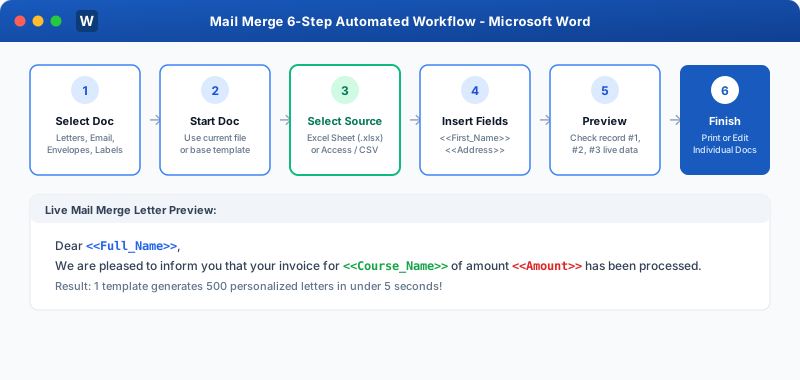
Mail Merge Architecture and Automated Workflow
The Three Pillars of Mail Merge
1
The Main Document:
The master template containing static boilerplate text (company letterhead, formal body paragraphs, signature block) and placeholders called Merge Fields (e.g. <<First_Name>>, <<Balance_Due>>).
1
The Data Source (Recipient List):
The database containing recipient records in organized columns and rows.
Most commonly an Excel Workbook (.xlsx), Access Database (.accdb), Outlook Contacts list, or CSV text file.
1
The Merged Output Document:
The final product generated when Word matches the main template with the data source.
You can choose to:
Edit Individual Documents: Creates a giant multi-page Word file with 1 page per recipient.
Print Documents: Sends all merged letters directly to the printer.
Send Email Messages: Automatically emails personalized emails through Outlook!
Types of Documents Supported by Mail Merge
Letters: Individual personalized correspondence with custom names, dates, and account numbers.
Email Messages: Mass personalized emails sent through Microsoft Outlook.
 Click to Zoom