VLOOKUP (Vertical Lookup) is one of the most widely used functions in business spreadsheets. It searches for a specific search key down the first column of a table and retrieves data from a corresponding column in the same row.
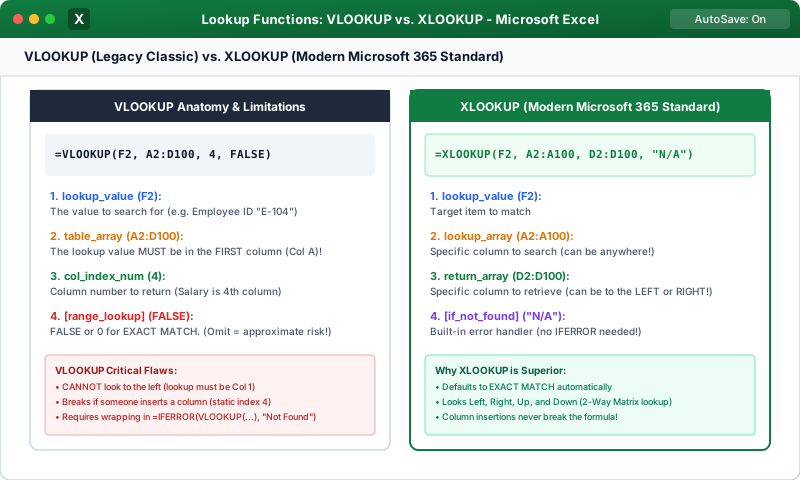
1. Anatomy of the VLOOKUP Formula
Every VLOOKUP statement requires four distinct arguments:
+-------------------+-------------------------------------------------------------+
| Argument          | Purpose & Practical Role                                    |
+-------------------+-------------------------------------------------------------+
| lookup_value      | What you are searching for (e.g., EmpID cell "A2").        |
| table_array       | The table range to search (e.g., $E$2:$H$100).              |
| col_index_num     | The column number in table_array from which to return data. |
| [range_lookup]    | FALSE (or 0) for EXACT match; TRUE (or 1) for APPROXIMATE. |
+-------------------+-------------------------------------------------------------+
Click to Zoom
VLOOKUP and Lookup Functions Architecture
2. Step-by-Step Practical Example
Suppose you have an Employee Directory in 'E2:H50':
Column E (Col 1): Employee ID (e.g., 'EMP-104')
Column F (Col 2): Full Name
Column G (Col 3): Department
Column H (Col 4): Salary
In an invoice or timesheet sheet, cell A2 contains 'EMP-104'. To pull the matching Department:
1=VLOOKUP(A2, $E$2:$H$50, 3, FALSE)
Explanation of Execution:
1
Excel takes 'EMP-104' from A2.
2
It navigates to the first column (Column E) of '$E$2:$H$50'.
3
It scans downward until it finds an exact match for 'EMP-104'.
4
It shifts across to Column 3 of the range (Column G, Department).
5
It returns the department value (e.g., 'Finance').
3. The 3 Golden Rules of VLOOKUP
1
The Lookup Column Must Be First (Leftmost): VLOOKUP cannot look to its left. Your search key (e.g., EmpID) must reside in the leftmost column of 'table_array'.
2
Lock Your Table Array with Dollar Signs ($): Always use '$E$2:$H$50' instead of 'E2:H50'. If you forget '$', dragging the formula down shifts the search range into blank cells below!
3
Always Set Range Lookup to FALSE (0): For 99% of business lookups (IDs, SKUs, names, codes), always specify FALSE (or 0) to ensure exact matching. If omitted, Excel defaults to TRUE (approximate match), which can return incorrect values from unsorted data!
Interactive Quiz• Knowledge Check
Multiple Choice Questions
Question 1
What does the number 3 represent in '=VLOOKUP(A2, $D$2:$G$100, 3, FALSE)'?
Question 2
Why is it essential to set the 4th argument of VLOOKUP to FALSE (or 0) when looking up employee IDs or product SKUs?
Question 3
What critical limitation exists in traditional VLOOKUP?
Question 4
What error does VLOOKUP return if the lookup_value cannot be found in the first column of the table array when using FALSE?
Question 5
Why should you use '$B$2:$E$100' instead of 'B2:E100' for the table_array argument?
Next Lesson
HLOOKUP Basics & Approximate Match Ranges
Continue learning with hands-on practice, examples, and exercises in the upcoming topic.
 Click to Zoom