SUM, AVERAGE, MIN, MAX Functions
Functions are pre-packaged mathematical algorithms built directly into Excel. While simple arithmetic (=A1+B1) works for two numbers, functions allow you to summarize thousands of rows with a single parameter range.
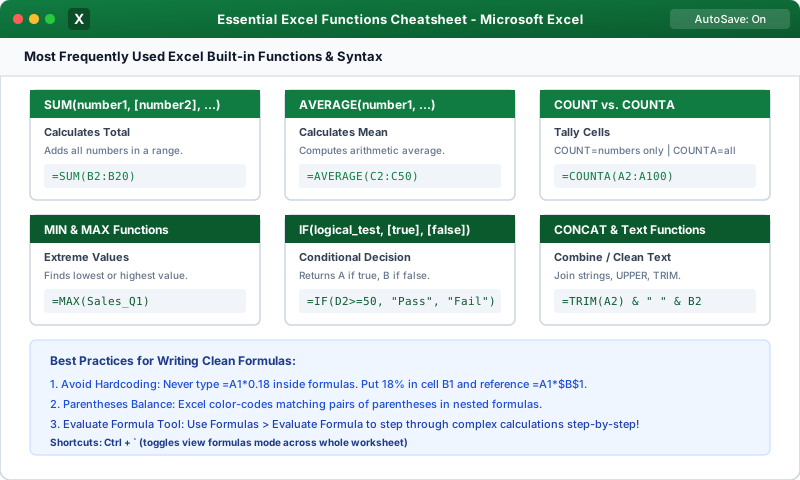
1. The SUM Function
Adds all individual numbers, cell references, and multi-column ranges:
- Single Range:
=SUM(B2:B25)(Adds all cells between B2 and B25). - Multiple Disconnected Ranges:
=SUM(B2:B10, D2:D10, F5)(Separated by commas). - Entire Columns:
=SUM(B:B)(Adds every value in column B, automatically incorporating new rows as they are added).
2. The AVERAGE Function
Computes the mathematical arithmetic mean (sum divided by count) of a dataset:
AVERAGE ignores completely blank cells. If you have 4 tests with scores (100, 100, 100, and blank), the average is 300 / 3 = 100.
- If you enter a literal number 0 in the fourth cell, AVERAGE includes the zero: 300 / 4 = 75! Always be mindful when entering zero vs. leaving a cell empty.3. The MIN and MAX Functions
Locates extreme values in any numerical dataset:
- MIN: Returns the smallest numerical value in the range.
- MAX: Returns the largest numerical value in the range.
- Use Cases: Finding the lowest product price, oldest invoice date, highest test score, or peak daily revenue.
4. COUNT vs. COUNTA (Counting Cells)
A frequent point of confusion for spreadsheet users:
- COUNT: Counts only cells that contain NUMBERS. It completely ignores text words, blanks, and errors.
- COUNTA ("Count All"): Counts any cell that is not empty. It tallies numbers, text labels, codes, and dates (great for counting how many employee names are in an attendance roster!).
- COUNTBLANK: Counts the number of empty, blank cells in a range.
Multiple Choice Questions
1. What does the formula =AVERAGE(B2:B5) return if cells B2, B3, and B4 contain the number 30, and B5 is completely blank?
A. 22.5 B. 30 C. 0 D. #VALUE! Answer: B Explanation: The AVERAGE function ignores blank cells; it computes the sum of the three numbers (90) divided by 3, returning 30.
2. Which function counts only cells containing numeric values while ignoring text labels?
A. COUNTA B. COUNT C. COUNTIF D. COUNTBLANK Answer: B Explanation: COUNT only registers cells containing numbers or dates. To count cells with text names or alphanumeric codes, one must use COUNTA.
3. Which formula correctly finds the highest sales revenue figure in the range C2 through C50?
A. =HIGH(C2:C50) B. =MAX(C2:C50) C. =TOP(C2:C50) D. =PEAK(C2:C50) Answer: B Explanation: The MAX function identifies and returns the maximum (highest) numerical value present within the specified range.
4. How can you sum two non-adjacent cell ranges (such as Column B and Column D) inside a single SUM function?
A. =SUM(B2:B10 + D2:D10) B. =SUM(B2:B10, D2:D10) C. =SUM(B2:B10 & D2:D10) D. =SUM(B2:B10 / D2:D10) Answer: B Explanation: Function arguments are separated by commas; =SUM(range1, range2) calculates the grand sum across all specified non-contiguous ranges.
5. What function counts how many customer order rows have missing, blank shipping address cells?
A. COUNTBLANK B. EMPTYCOUNT C. COUNTNULL D. ISBLANKCOUNT Answer: A Explanation: COUNTBLANK scans a designated range and tallies the total number of empty, unpopulated cells.
Basic Text Functions (CONCATENATE, UPPER, LOWER)
Continue learning with hands-on practice, examples, and exercises in the upcoming topic.
Related Lessons
| Previous Lesson | Next Lesson |
|---|---|
| AutoSum and Status Bar Calculations | Basic Text Functions (CONCATENATE, UPPER, LOWER) |
Practice Quiz
Test your understanding of this lesson with 5 questions. Each question has one correct answer.