Task Lists & Interactive Checkboxes
Task lists (also known as todo lists or checklist items) are one of the most widely used features in modern agile software development. In platforms like GitHub, GitLab, and Linear, task lists render as interactive, clickable checkboxes that allow teams to track progress directly within issues, pull requests, and project boards.
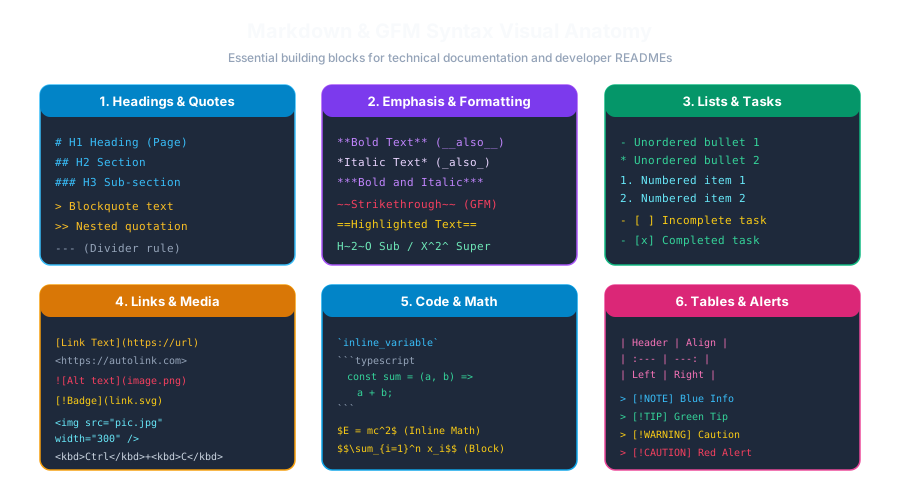
1. Task List Syntax (GFM Extension)
To create a task list item, start with an unordered list marker (-, *, or +), followed by a space, a pair of square brackets ([ ]), another space, and your task description:
Rendered Output:
- Incomplete task item (Unchecked)
- Completed task item (Checked)
- [ ] text (Must have a single space between the brackets: [ + + ])
- Completed: - [x] text (Can be lowercase x or uppercase X)
- Common Error: -[ ] or -[x] without a leading space will fail to render as a checkbox!2. Interactive Behavior on GitHub & GitLab
When task lists are placed in a GitHub Issue or Pull Request description:
- 1Clickable State: You can click the checkbox directly in the web browser to toggle its state between checked and unchecked without opening the Markdown raw editor!
- 2Issue Header Counter: GitHub displays an automated completion indicator in the issue title bar (e.g., "3 of 5 tasks").
- 3PR Merge Checks: Some teams configure automated CI checks that block merging a Pull Request until all task list items (
[ ]) are marked as completed ([x]).
3. Nested & Multi-Level Task Lists
You can nest task lists hierarchically to represent parent epics and child sub-tasks:
Multiple Choice Questions
1. Which specification introduced task lists with interactive checkboxes?
A. Original Gruber Markdown 2004 B. GitHub Flavored Markdown (GFM) C. LaTeX 2e D. HTML 3.2 Answer: B Explanation: Task lists with [ ] and [x] checkboxes are an extension formalized by GitHub Flavored Markdown.
2. How do you mark a task list item as 'completed' in Markdown source text?
A. - (x) B. - [x] or - [X] C. - {x} D. - <done> Answer: B Explanation: Placing an 'x' or 'X' between square brackets (- [x]) marks the checkbox as checked/completed.
3. What must be placed between the square brackets to represent an incomplete/unchecked task?
A. The word 'no' B. A single space (- [ ]) C. A zero (- [0]) D. Nothing (- []) Answer: B Explanation: An unchecked task requires a single space character between the brackets (- [ ]). Leaving no space (- []) breaks the syntax.
4. What happens when you click a task list checkbox inside a GitHub Pull Request description?
A. It opens the raw editor immediately B. GitHub automatically updates the underlying markdown source to toggle between [ ] and [x] without editing mode C. It deletes the Pull Request D. It restarts your computer Answer: B Explanation: GitHub provides interactive toggle support where clicking the checkbox automatically commits the change to the issue/PR description.
5. What HTML elements are typically generated for a GFM task list item?
A. <li><input type="checkbox" disabled /> Task description</li> B. <select><option>Task</option></select> C. <button>Task</button> D. <textarea>Task</textarea> Answer: A Explanation: GFM task lists compile to an HTML <li> containing an <input type="checkbox"> element.
Links: Inline, Reference & Automatic URLs
Continue learning with hands-on practice, examples, and exercises in the upcoming topic.
Related Lessons
| Previous Lesson | Next Lesson |
|---|---|
| Ordered Lists & Nested Outlines | Links: Inline, Reference & Automatic URLs |
Practice Quiz
Test your understanding of this lesson with 5 questions. Each question has one correct answer.