Links: Inline, Reference & Automatic URLs0%

Links: Inline, Reference & Automatic URLs

Beginner12 min readUpdated: Jul 11, 2026
Study Materials

Hyperlinks are the foundation of the World Wide Web. Markdown provides multiple distinct ways to create links: Inline Links (for quick one-off references), Reference-Style Links (for clean, readable source text), and Autolinks (for bare URLs).
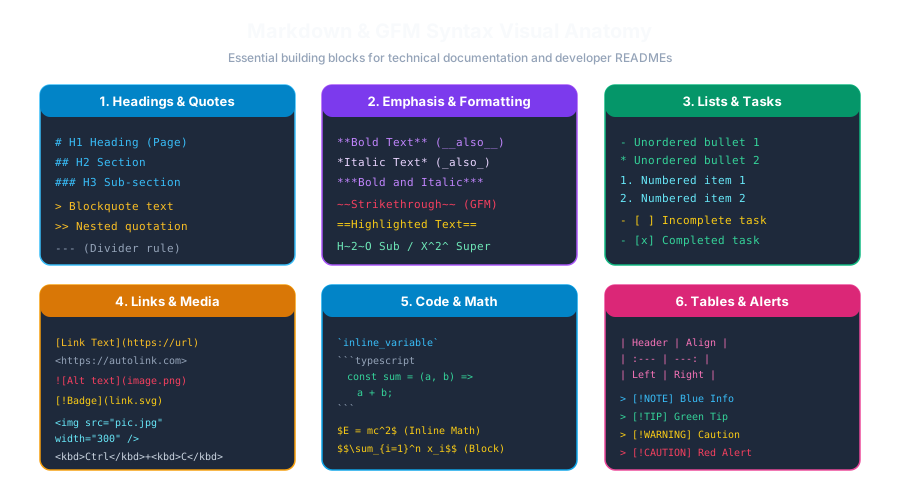
Markdown Syntax AnatomyClick to Zoom
Markdown Syntax Anatomy

An inline link consists of the clickable anchor text in square brackets [ ], immediately followed by the destination URL in parentheses ( ):

Markdown
Visit the official [MSK Institute](https://mskinstitute.in) website.
  • HTML Output: <a href="https://mskinstitute.in">MSK Institute</a>

Adding a Hover Title (Tooltip):

You can include an optional hover title by adding text in double quotes inside the parentheses:

Markdown
Read our [Python Tutorial](https://mskinstitute.in/tutorials/python-for-beginners "Master Python in 30 days")!

Links do not have to point to external websites; they can point to local files or section headings within the same document:

Markdown
See the [Installation Guide](./docs/install.md) for step-by-step setup.

Markdown parsers automatically convert headings into URL slugs (lowercased, spaces replaced by hyphens):

Markdown
Jump directly to the [System Requirements](#system-requirements) section below.
 
## System Requirements
- Node.js 18+
- 4GB RAM

When linking to long URLs multiple times throughout an article, inline links can make the raw source text messy and difficult to read. Reference links keep your paragraphs clean by defining the destination URL at the bottom of the document:

Markdown
Markdown was designed by [John Gruber][gruber] and [Aaron Swartz][swartz].
Both [gruber] and [swartz] believed in open plain-text standards.
 
<!-- Link Definitions placed at bottom of file -->
[gruber]: https://daringfireball.net/projects/markdown/
[swartz]: https://en.wikipedia.org/wiki/Aaron_Swartz

If you simply want to display a clickable URL or email address without custom anchor text:

Enclose the URL in angle brackets < >:

Markdown
Visit <https://mskinstitute.in> or contact <support@mskinstitute.in>.

GFM Extended Autolinking:

In GitHub Flavored Markdown, any bare URL beginning with http://, https://, or www. is automatically converted into a clickable link without requiring angle brackets:

Markdown
Visit https://mskinstitute.in for courses.

Multiple Choice Questions

A. (link text)[https://url.com] B. link text C. {link text}<https://url.com> D. <https://url.com>[link text] Answer: B Explanation: Square brackets enclose the visible link text, followed immediately by parentheses containing the URL: link text.


A. link B. link{title="Hover Title"} C. link "Hover Title" D. <title link> Answer: A Explanation: Placing quoted text inside the parentheses after the URL defines the HTML title attribute shown on hover.


A. They make the webpage download faster B. They keep the raw Markdown prose clean and uncluttered by moving long URLs to the bottom of the file C. They bypass browser firewalls D. They automatically translate text into French Answer: B Explanation: Reference links separate URLs from paragraph body text, keeping the raw document pleasant and natural to read.


A. Jump to Install B. Jump to Install C. Jump to Install D. Jump to Install Answer: A Explanation: Headings automatically generate lowercase hyphenated anchor slugs prefixed by a hash (#installation-guide).


A. [email] B. <support@example.com> C. (support@example.com) D. {support@example.com} Answer: B Explanation: Wrapping an email address in angle brackets (<support@example.com>) compiles to <a href="mailto:support@example.com">.


Next Lesson

Images, Alt Text & Captions

Continue learning with hands-on practice, examples, and exercises in the upcoming topic.

Practice Quiz

Test your understanding of this lesson with 5 questions. Each question has one correct answer.

PrevNext