Embedding Raw HTML & Media in Markdown0%

Embedding Raw HTML & Media in Markdown

Beginner12 min readUpdated: Jul 11, 2026
Study Materials

One of Markdown's most powerful architectural features is that it does not attempt to replace HTML. John Gruber explicitly designed Markdown as a writing format that seamlessly integrates with raw HTML tags whenever markdown syntax falls short.

If a feature cannot be expressed in Markdown (such as centering an image, creating a collapsible FAQ accordion, or displaying keyboard key caps), you can write raw HTML directly in your .md file!
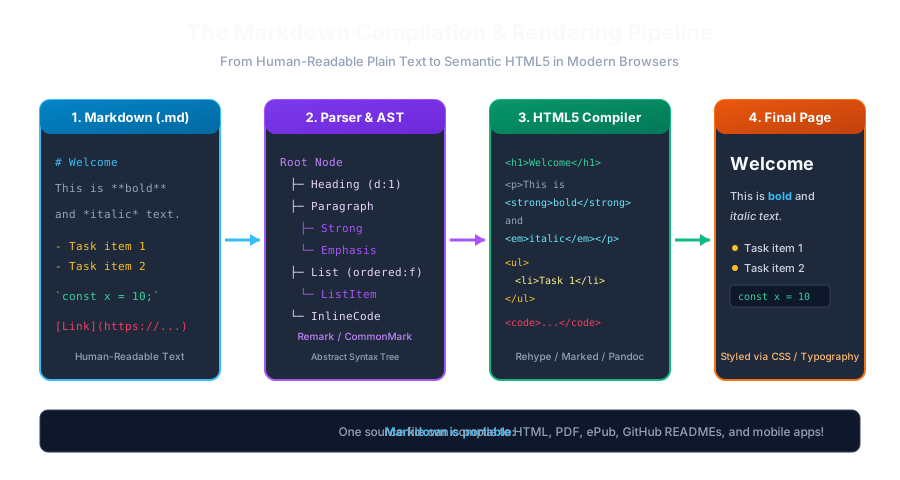
Markdown Compilation PipelineClick to Zoom
Markdown Compilation Pipeline

1. The Raw HTML Rule in Markdown

Any raw HTML5 element placed inside a Markdown file is passed through directly to the compiled HTML output without modification:

Markdown
This is a standard Markdown paragraph.
 
<div style="background: #1e293b; padding: 16px; border-radius: 8px; color: #38bdf8;">
<strong>Notice:</strong> This styled callout box is created with raw HTML and CSS!
</div>
Blank Line Rule (Block-Level HTML): In CommonMark, block-level HTML tags (like <div>, <p>, <table>, or <section>) should be separated from surrounding Markdown paragraphs by blank lines to prevent parsing glitches.

2. High-Value HTML Tags for Technical Writers

1. Collapsible Accordions (<details> & <summary>)

Perfect for hiding long code snippets, spoilers, FAQ answers, or optional setup steps:

Markdown
<details>
<summary><b>🔍 Click here to view the full database migration SQL</b></summary>
 

CREATE TABLE users ( id SERIAL PRIMARY KEY, username VARCHAR(50) NOT NULL UNIQUE );

Output
 
</details>

2. Keyboard Key Caps (<kbd>)

Display hotkeys and keyboard shortcuts cleanly:

Markdown
To open the command palette in VS Code, press <kbd>Ctrl</kbd> + <kbd>Shift</kbd> + <kbd>P</kbd>.

(Renders key caps with distinct borders).

3. Highlighting Text (<mark>)

Markdown
The token expires in <mark>60 seconds</mark>.

4. Subscript & Superscript (<sub> & <sup>)

Markdown
Chemical Formula: H<sub>2</sub>O
Einstein Equation: E = mc<sup>2</sup>

3. Embedding Audio & Video Media

Standard Markdown does not have native audio or video players. Use HTML5 media tags:

Embedded Video:

Markdown
<video width="640" height="360" controls poster="/images/poster.jpg">
<source src="/videos/tutorial-demo.mp4" type="video/mp4" />
Your browser does not support the video tag.
</video>

Responsive YouTube / Loom Video Embeds:

Markdown
<iframe width="560" height="315" src="https://www.youtube.com/embed/dQw4w9WgXcQ" title="YouTube video player" frameborder="0" allowfullscreen></iframe>

Multiple Choice Questions

1. How does a Markdown compiler handle raw HTML tags written inside a .md file?

A. It throws a fatal syntax error B. It ignores them and deletes them C. It passes the HTML tags through directly into the generated output D. It converts the HTML into Python scripts Answer: C Explanation: Markdown is designed to allow raw HTML tags to pass directly through into the compiled document output.


2. Which HTML5 element pair is used inside Markdown to create collapsible dropdown accordions?

A. <dropdown> and <item> B. <details> and <summary> C. <accordion> and <tab> D. <collapse> and <toggle> Answer: B Explanation: The <details> tag with a <summary> heading creates native, interactive collapsible disclosure widgets supported in all modern browsers and GitHub.


3. Which semantic HTML tag is used to visually represent keyboard shortcut keys (like Ctrl or Enter) in documentation?

A. <key> B. <kbd> C. <btn> D. <input> Answer: B Explanation: The <kbd> (keyboard input) tag denotes user input from a keyboard, typically styled with rounded borders like a physical key cap.


4. How can you center-align an image or text block in standard Markdown?

A. Using the center* markdown marker B. Wrapping the element in an HTML <div align="center"> or <div style="text-align: center;"> tag C. Pressing Tab 10 times D. Markdown automatically centers all content Answer: B Explanation:** Since Markdown lacks native text alignment syntax, HTML container tags (<div style="text-align: center;">) provide alignment control.


5. Why must block-level HTML tags typically be preceded and followed by blank lines in CommonMark?

A. To prevent the Markdown parser from treating the HTML as an inline continuation of a paragraph B. To reduce file size C. Blank lines are required by the CSS engine D. To encrypt the file Answer: A Explanation: CommonMark requires blank lines around block-level HTML to clearly delineate where standard markdown parsing stops and raw HTML starts.


Next Lesson

Inline Code & Backtick Escaping Rules

Continue learning with hands-on practice, examples, and exercises in the upcoming topic.

Practice Quiz

Test your understanding of this lesson with 5 questions. Each question has one correct answer.

PrevNext