MSK Institute • Shikohabad
Loading Page Content...
Preparing courses, live labs, and learning resources.सामग्री लोड हो रही है, कृपया प्रतीक्षा करें...
Connecting serverPlease wait...
💻 Practical Labs🚀 Free Demo📜 Verified Certificates
Preparing courses, live labs, and learning resources.सामग्री लोड हो रही है, कृपया प्रतीक्षा करें...
In technical documentation, distinguishing between ordinary human language and technical identifiers (such as function names, shell commands, file paths, and environment variables) is critical. Markdown uses backticks (``) for inline code formatting.
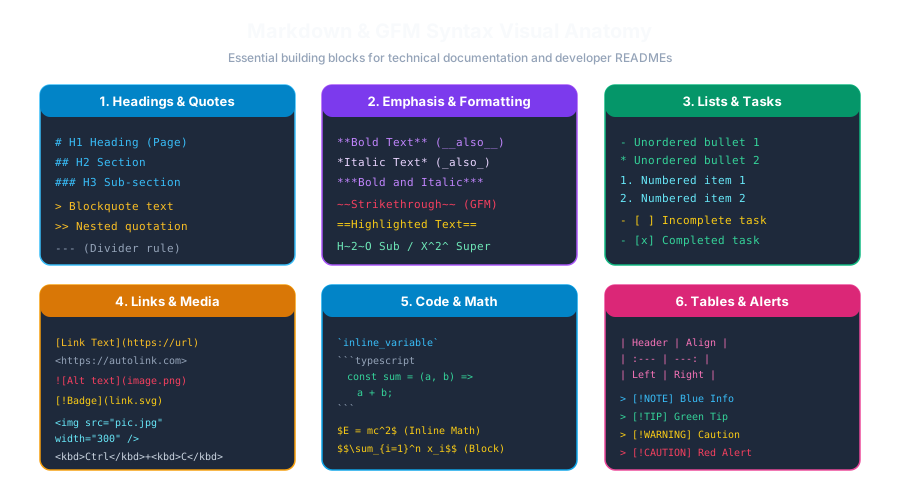 Click to Zoom
To format text as inline code, surround it with a single backtick (``):
<code>npm install</code><code> in a monospaced font (like Courier or JetBrains Mono) with a subtle background shade.What happens if the code snippet you want to display contains a backtick itself?
For example, in JavaScript template literals:
If you wrap this in single backticks (` const greeting = Hello ${name}; `), the parser gets confused because it sees the first backtick as the closing delimiter!
To display a literal backtick inside inline code, wrap the code in double backticks (` ``):
Rendered Output: Use code to format inline code in Markdown.
hello ``
- The parser will automatically strip the outer single padding spaces from the rendered output!Use Inline Code (` code `) | Use Fenced Code Block (```js) |
|---|---|
Single words, function names: fetch() | Multi-line scripts, complete functions |
CLI commands: git commit -m "feat" | Configuration files (JSON, YAML, Dockerfile) |
File names and paths: package.json | Code that requires syntax highlighting |
Keyboard keys and HTTP status codes: 404 | Terminal output logs with multiple lines |
Continue learning with hands-on practice, examples, and exercises in the upcoming topic.
| Previous Lesson | Next Lesson |
|---|---|
| Embedding Raw HTML & Media in Markdown | Fenced Code Blocks & Syntax Highlighting |
Test your understanding of this lesson with 5 questions. Each question has one correct answer.