Introduction to Spreadsheets and Interface0%

Introduction to Spreadsheets and Interface

Beginner12 min readUpdated: Jul 11, 2026
Study Materials

Spreadsheet: Introduction to Spreadsheets and Interface (स्प्रेडशीट परिचय)

A Spreadsheet is an interactive computer application designed for organizing, analyzing, calculating, and visualizing tabular numerical data.

In the NIELIT CCC examination, questions on LibreOffice Calc (Free & Open Source) and Microsoft Excel are tested extensively.
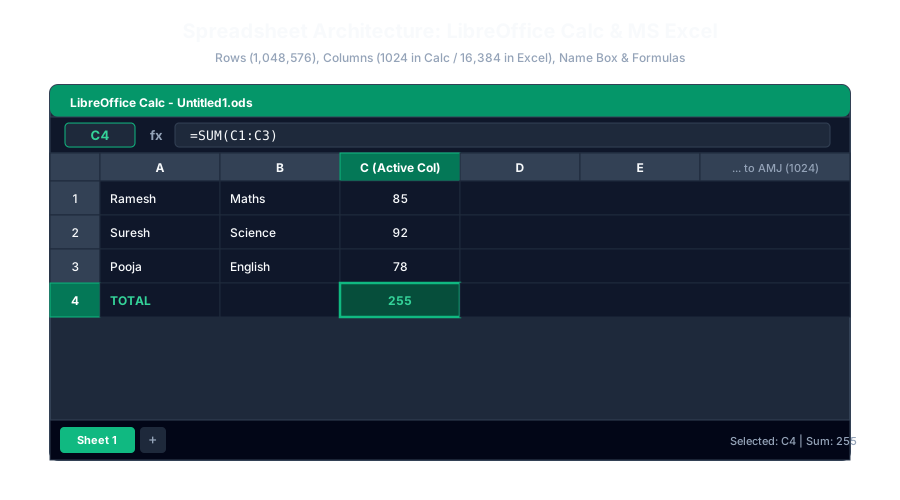
Spreadsheet Interface and GridClick to Zoom
Spreadsheet Interface and Grid

1. Core Spreadsheet Concepts

  1. 1
    Workbook (वर्कबुक): A spreadsheet file saved on your computer. Think of a Workbook as a physical Notebook (खाता बही).
  2. 2
    Worksheet (वर्कशीट): A single grid page inside the workbook consisting of rows and columns. Think of a Worksheet as an individual Page inside the notebook. A workbook can contain hundreds of worksheets (Sheet1, Sheet2...).
  3. 3
    Rows (पंक्तियाँ): Horizontal lines of cells identified by Numbers ($1, 2, 3...$).
  4. 4
    Columns (स्तंभ): Vertical lines of cells identified by Alphabet Letters ($A, B, C... Z, AA, AB...$).
  5. 5
    Cell (सेल): The rectangular box formed by the intersection of a row and a column. Every cell has a unique Cell Address (e.g. A1, C4, Z100).
  6. 6
    Active Cell (सक्रिय सेल): The currently selected cell highlighted with a thick border where newly typed data appears.

2. Anatomy of the LibreOffice Calc Interface

  • Title Bar: Displays file name (Default: Untitled 1 - LibreOffice Calc).
  • Name Box (नेम बॉक्स): Located on the left side just above the column headers. It displays the address of the currently active cell (e.g. B5).
  • Formula Bar (फॉर्मूला बार - fx): Located next to the Name Box. Displays the actual formula or raw contents stored inside the active cell.
  • Column Headers (कॉलम हेडर): Alphabet letters ($A, B, C...$).
  • Row Headers (रो हेडर): Numbers ($1, 2, 3...$).
  • Sheet Tabs: Located at the bottom left (Sheet1, Sheet2...) allowing you to switch between sheets or add new ones by clicking the + button.
  • Status Bar: Displays current sheet number, cell selection details, and real-time calculations (Average, Sum) of highlighted cells.

3. Dimensional Limits: Calc vs Excel (Super Important for CCC!)

Memorize this comparison table thoroughly—these exact numbers are asked in almost every CCC exam:

ParameterLibreOffice Calc (लिब्रेऑफिस कैल्क)Microsoft Excel (एमएस एक्सेल)
Default File Extension.ods (OpenDocument Spreadsheet).xlsx / .xls
Default File NameUntitled 1Book 1
Total Number of Rows1,048,576 ($2^{20}$)1,048,576 ($2^{20}$)
Total Number of Columns1,024 (Columns $A$ to AMJ)16,384 (Columns $A$ to XFD)
Last Column NameAMJXFD
Total Cells in Sheet$1,048,576 \times 1,024 = 1,073,741,824$$1,048,576 \times 16,384 = 17,179,869,184$
Minimum Zoom Level20%10%
Maximum Zoom Level400%400%

(Note: Newer versions of LibreOffice Calc 7.4+ support 16,384 columns optionally, but in standard NIELIT CCC question papers, 1024 / AMJ is the recognized standard answer).


Multiple Choice Questions

1. What is the total number of rows in a worksheet of LibreOffice Calc?

A. 65,536 B. 1,048,576 C. 1,000,000 D. 16,384 Answer: B Explanation: Both LibreOffice Calc and modern Microsoft Excel contain exactly 1,048,576 rows per worksheet (numbered 1 through 1,048,576).


2. What is the name of the last column in a standard LibreOffice Calc worksheet?

A. XFD B. AMJ C. ZZZ D. AZZ Answer: B Explanation: In standard LibreOffice Calc (1024 columns), the very last column is labeled AMJ. In MS Excel (16,384 columns), the last column is XFD.


3. Which component of the Calc interface displays the cell address of the currently active cell?

A. Formula Bar B. Name Box C. Title Bar D. Status Bar Answer: B Explanation: The Name Box, situated to the left of the formula bar, displays the coordinate address of the active cell (e.g. C4).


4. What is the default file extension of a spreadsheet created in LibreOffice Calc?

A. .docx B. .ods C. .odt D. .odp Answer: B Explanation: LibreOffice Calc saves spreadsheets in OpenDocument Spreadsheet format with the default extension .ods.


5. What is the maximum zoom level permitted in LibreOffice Calc?

A. 200% B. 300% C. 400% D. 500% Answer: C Explanation: In LibreOffice Calc, the maximum zoom percentage is 400% (minimum is 20%).


Next Lesson

Creating and Saving Worksheets

Continue learning with hands-on practice, examples, and exercises in the upcoming topic.

Practice Quiz

Test your understanding of this lesson with 5 questions. Each question has one correct answer.

PrevNext