1D Array Indexing, Slicing & Step Strides0%

1D Array Indexing, Slicing & Step Strides

Beginner12 min readUpdated: Jul 11, 2026
Study Materials

1D Array Indexing, Slicing & Step Strides

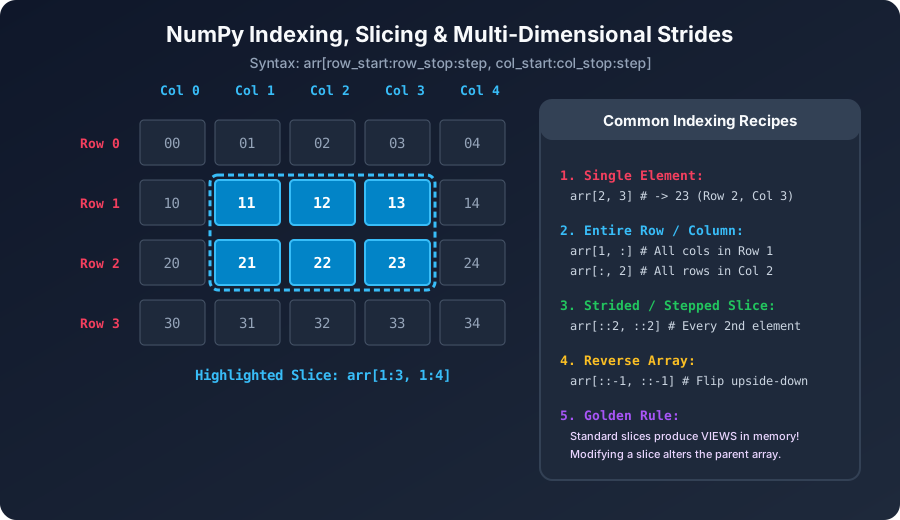
Indexing and slicing allow you to extract individual elements, sub-ranges, and strided patterns from arrays. While 1D NumPy slicing closely resembles Python list slicing, it introduces fundamental differences in memory handling and performance.


1. Zero-Based & Negative Indexing

Like standard Python, NumPy uses zero-based indexing for forward navigation and negative integers to count backwards from the end:
Python
import numpy as np
 
arr = np.array([10, 20, 30, 40, 50, 60, 70])
 
print(arr[0]) # 10 (First element)
print(arr[2]) # 30 (Third element)
print(arr[-1]) # 70 (Last element)
print(arr[-3]) # 50 (Third from the end)
NumPy Indexing, Slicing and StridesClick to Zoom
NumPy Indexing, Slicing and Strides

2. Basic Slicing Syntax: [start : stop : step]

A slice extracts a range of elements defined by three parameters separated by colons:

Python
# Syntax: arr[start:stop:step]
# - start: Index where slice begins (INCLUSIVE, defaults to 0)
# - stop: Index where slice ends (EXCLUSIVE, defaults to len)
# - step: Interval stride count (defaults to 1)
 
data = np.array([100, 200, 300, 400, 500, 600, 700, 800])
 
# Slice from index 2 up to index 6 (not including 6)
print(data[2:6]) # [300 400 500 600]
 
# Slice from beginning up to index 4
print(data[:4]) # [100 200 300 400]
 
# Slice from index 4 to the very end
print(data[4:]) # [500 600 700 800]
 
# Extract every 2nd element across the entire array
print(data[::2]) # [100 300 500 700]
 
# Negative step: Reverse the entire array effortlessly!
print(data[::-1]) # [800 700 600 500 400 300 200 100]

3. The Power of In-Place Mutation via Slices

In pure Python lists, assigning to a slice copies new pointers. In NumPy, assigning a scalar to a slice performs an instant vectorized broadcast assignment in contiguous RAM:

Python
numbers = np.zeros(8, dtype=int)
print(numbers) # [0 0 0 0 0 0 0 0]
 
# Set elements from index 2 to 5 to the number 99
numbers[2:6] = 99
print(numbers) # [ 0 0 99 99 99 99 0 0]
 
# Set every even index to -1
numbers[::2] = -1
print(numbers) # [-1 0 -1 99 -1 99 -1 0]

Multiple Choice Questions

1. What will 'arr[1:5]' extract from 'arr = np.array([10, 20, 30, 40, 50, 60])'?

A. array([10, 20, 30, 40, 50]) B. array([20, 30, 40, 50]) C. array([20, 30, 40]) D. array([10, 50]) Answer: B Explanation: Index 1 is 20; the slice stops before index 5 (60), returning elements at indices 1, 2, 3, and 4 ([20, 30, 40, 50]).


2. What is the most concise, idiomatic NumPy slice expression to invert the order of an array backwards?

A. arr.reverse() B. arr[::-1] C. arr[-1:0] D. arr[0:-1:-1] Answer: B Explanation: Slicing with [::-1] sets the step stride to -1 from end to start, reversing the array in constant time as a memory view.


3. What happens when you execute 'arr[2:5] = 0' on a NumPy array?

A. Deletes indices 2, 3, and 4 B. Sets elements at indices 2, 3, and 4 to 0 simultaneously via broadcast assignment C. Raises a TypeError D. Converts the array to None Answer: B Explanation: NumPy supports slice assignment; setting a slice equal to a scalar broadcasts that value across all elements in the slice.


4. What will 'np.arange(10)[::3]' return?

A. array([0, 3, 6, 9]) B. array([3, 6, 9]) C. array([0, 1, 2]) D. array([9, 6, 3, 0]) Answer: A Explanation: The slice [::3] steps across the range 0 to 9 with a stride of 3, extracting indices 0, 3, 6, and 9.


5. In the slice syntax 'arr[start:stop:step]', which boundary is EXCLUDED from the returned array?

A. start B. stop C. step D. None, all boundaries are inclusive Answer: B Explanation: Slicing in Python and NumPy follows half-open intervals [start, stop) where the stop index is strictly excluded.


Next Lesson

Multi-Dimensional Array Slicing (Row, Column & Matrix Slices)

Continue learning with hands-on practice, examples, and exercises in the upcoming topic.

Practice Quiz

Test your understanding of this lesson with 5 questions. Each question has one correct answer.

PrevNext