NumPy vs Python Lists: Memory & Speed Benchmarks
To appreciate why data science is built on NumPy, you must measure the concrete differences in memory footprint and execution latency between standard Python lists and NumPy arrays.
1. Memory Consumption Benchmark
Let us compare the RAM consumption of storing 1,000,000 integers using a standard Python list versus a NumPy ndarray:
Result: The Python list consumes nearly 5 times more memory because each number is an individual heap object wrapped with overhead, whereas NumPy stores 1,000,000 raw 8-byte numbers back-to-back in continuous memory!
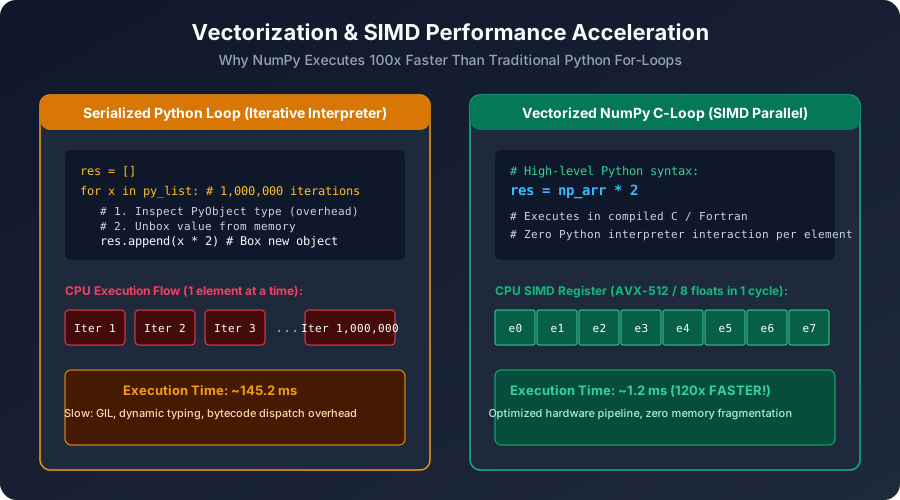
2. Speed Benchmark: Element-Wise Multiplication
Suppose we want to multiply two collections of 10,000,000 numbers element-by-element:
3. Summary Comparison Table
| Feature | Standard Python List | NumPy ndarray |
|---|---|---|
| Data Types | Heterogeneous (can mix ints, strings, objects) | Homogeneous (all elements share identical dtype) |
| Memory Layout | Array of pointers pointing to fragmented heap objects | Raw contiguous memory block in RAM |
| Element Size | 28+ bytes per integer | Exactly 8 bytes (int64) or 4 bytes (int32) |
| Mathematical Operations | Not supported natively (+ concatenates lists!) | Rich element-wise vectorization (+, -, *, @) |
| Execution Speed | Interpreted Python bytecode loop (Slow) | Compiled C / Fortran with SIMD registers (Blazing fast) |
Multiple Choice Questions
1. What does the '+' operator do when applied between two standard Python lists: '[1, 2] + [3, 4]'?
A. Calculates element-wise addition: [4, 6] B. Concatenates the lists together: [1, 2, 3, 4] C. Returns a syntax error D. Calculates the dot product Answer: B Explanation: In pure Python, '+' concatenates lists. In NumPy, 'np.array([1, 2]) + np.array([3, 4])' performs vectorized element-wise addition returning array([4, 6]).
2. Approximately how much faster is vectorized element-wise multiplication in NumPy compared to a standard Python for-loop on large arrays?
A. 2x B. 50x to 100x or more C. Python lists are actually faster D. Exactly the same Answer: B Explanation: Due to contiguous memory, compiled C loops, and SIMD hardware registers, NumPy typically executes 50x to 100x faster than pure Python bytecode.
3. Which attribute of a NumPy array returns the total memory consumed by its data buffer in bytes?
A. arr.memory B. arr.nbytes C. arr.bytesize D. arr.allocated Answer: B Explanation: The 'nbytes' attribute returns the total number of bytes consumed by the elements of the array (equal to arr.size * arr.itemsize).
4. What is meant by the term 'homogeneous' regarding NumPy arrays?
A. The array can only be modified on one computer B. Every single element in the array must share the exact same data type (e.g., all float64 or all int32) C. The array can only store positive numbers D. The array has only one dimension Answer: B Explanation: Homogeneous means every element in the array has identical byte size and data representation, allowing fixed mathematical stride offsets in memory.
5. Why does Python list comprehension suffer from high execution latency compared to NumPy?
A. Python checks CPU temperature on every step B. Each iteration requires bytecode instruction dispatch, dynamic type checking, and unboxing/boxing PyObjects C. Python only runs on 1 core of the CPU D. Lists cannot hold numbers larger than 1,000 Answer: B Explanation: Python's dynamic runtime inspects types, executes method lookups, and boxes intermediate results on each cycle, adding massive per-element overhead.
Creating 1D, 2D & 3D Arrays from Lists & Tuples
Continue learning with hands-on practice, examples, and exercises in the upcoming topic.
Related Lessons
| Previous Lesson | Next Lesson |
|---|---|
| Setting Up NumPy: Installation & Environment | Creating 1D, 2D & 3D Arrays from Lists & Tuples |
Practice Quiz
Test your understanding of this lesson with 5 questions. Each question has one correct answer.