In multi-dimensional arrays, slicing generalizes across multiple axes. Unlike standard Python (which requires clumsy chained brackets like matrix[row][col]), NumPy allows clean comma-separated slicing along every axis simultaneously: arr[row_slice, col_slice].
1. The 2D Coordinate Syntax: arr[rows, cols]
In a 2D matrix:
Axis 0 represents Rows (vertical dimension).
Axis 1 represents Columns (horizontal dimension).
1import numpy as np
2
3# Create a 4x5 matrix (4 rows, 5 columns)
4grid = np.array([
5[10,11,12,13,14],
6[20,21,22,23,24],
7[30,31,32,33,34],
8[40,41,42,43,44]
9])
10
11# Extract a single element at Row 2, Column 3
12print(grid[2,3])# 33
Click to Zoom
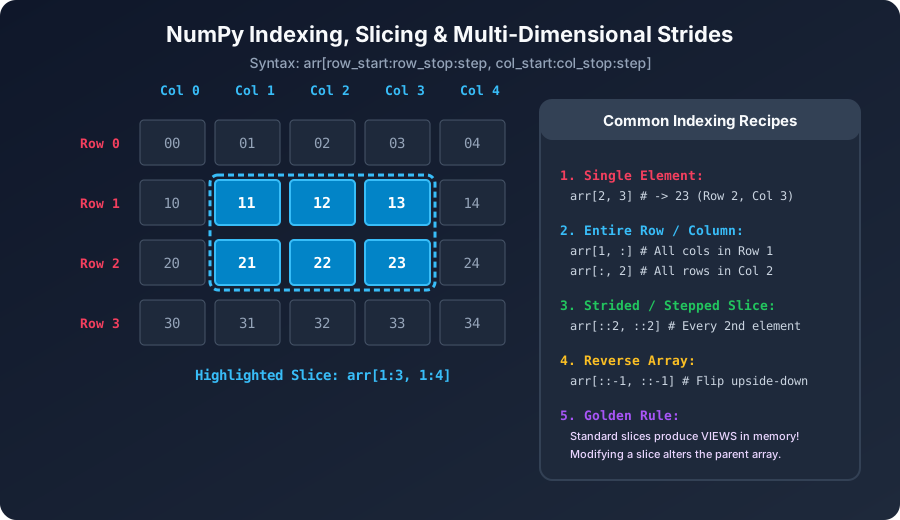
Multi-Dimensional Array Slicing Grid
2. Extracting Complete Rows and Columns
By using a lone colon : for an axis, you select all elements along that dimension:
1# Extract entire Row 1 (all columns)
2row_1 = grid[1,:]
3print(row_1)# [20 21 22 23 24]
4
5# Extract entire Column 2 (all rows)
6col_2 = grid[:,2]
7print(col_2)# [12 22 32 42]
3. Sub-Matrix Slicing (2D Blocks)
You can slice rows and columns simultaneously to extract sub-grids:
1# Extract Rows 1 to 3 (exclusive) and Columns 1 to 4 (exclusive)
2sub_block = grid[1:3,1:4]
3print(sub_block)
4# [[21 22 23]
5# [31 32 33]]
4. Preserving Dimensions vs Reducing Dimensions
Notice the subtle difference between slicing with a single integer versus a slice range:
1# Case A: Dimensionality Reduction (Returns 1D array)
2r1 = grid[0,:]
3print(r1.shape)# (5,) -> ndim reduced from 2 to 1!
4
5# Case B: Dimensionality Preserved (Returns 2D array with 1 row)
6r2 = grid[0:1,:]
7print(r2.shape)# (1, 5) -> ndim remains 2!
In machine learning algorithms and neural networks, keeping rank-2 shapes (1, 5) is often mandatory for matrix multiplication!
5. The Ellipsis Operator (...)
When slicing arrays with 4, 5, or more dimensions (such as video frames: [batch, frames, height, width, channels]), writing colons for every axis becomes tedious. The Ellipsis (...) automatically expands to as many full-slice colons : as needed:
1video = np.zeros((32,100,1080,1920,3))
2
3# Select only the Red channel (channel 0) across all batches, frames, height, and width:
4red_channel = video[...,0]# Equivalent to video[:, :, :, :, 0]
5print(red_channel.shape)# (32, 100, 1080, 1920)
Interactive Quiz• Knowledge Check
Multiple Choice Questions
Question 1
In a 2D NumPy array 'arr', how do you extract the entire third column across all rows?
Question 2
How does 'arr[0, :]' differ from 'arr[0:1, :]'?
Question 3
What does the Ellipsis operator '...' do in multidimensional slicing: 'tensor[..., 0]'?
Question 4
If matrix M has shape (6, 8), what will be the shape of 'M[2:5, 3:7]'?
Question 5
Why is 'matrix[1, 2]' preferred over 'matrix[1][2]' in NumPy?
Next Lesson
Memory Views vs Deep Copies (view() vs copy())
Continue learning with hands-on practice, examples, and exercises in the upcoming topic.
 Click to Zoom