Invitation Card & Certificate
Invitation Card & Certificate
Mini-Project 3: Designing Certificates & Invitation Cards
Designing certificates, event invitations, and gift vouchers requires creative manipulation of landscape orientations, decorative page borders, layered shapes, and elegant calligraphy typography.
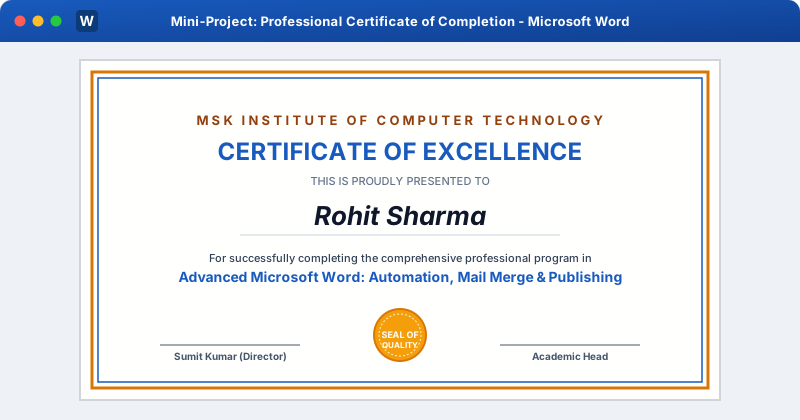 Click to Zoom
Step 1: Landscape Canvas & Margins
- 1Open a new document (
Ctrl + N). - 2Go to Layout > Orientation > Landscape.
- 3Set Margins to Narrow ($0.5\text{ in}$).
Step 2: Adding an Ornate Page Border
- 1Go to Design tab > click Page Borders (far right).
- 2In the Borders and Shading dialog:
- Select Box.
- Style: Double or triple line border, or select from the Art dropdown (ornate classical frames).
- Color: Deep Gold (
#D97706) or Navy Blue (#185ABD). - Width: 3 pt or 4.5 pt.
- Click Options... > set Measure from: Text (prevents printer clipping!).
Step 3: Typography & Title Hierarchy
- 1Organization Name: 14pt Bold Uppercase Gold with wide letter spacing:
MSK INSTITUTE OF COMPUTER TECHNOLOGY
- 1Main Heading: 26pt Bold Navy Blue centered:
CERTIFICATE OF EXCELLENCE
- 1Recipient Presentation Text:
THIS CERTIFICATE IS PROUDLY PRESENTED TO(11pt Muted Gray)
- 1Recipient Name:
- Choose a script/calligraphy font like Edwardian Script, Monotype Corsiva, or Brush Script MT in 32pt Bold Navy!
- Draw an elegant horizontal divider line beneath the name.
Step 4: Verification Statement & Ribbon Badge
- Paragraph text in 12pt Regular: "For outstanding performance and successful completion of the Full-Stack Developer Program."
- Gold Seal Badge:
- Go to Insert > Shapes > 32-Point Star or Seal.
- Fill with Gold gradient, outline in Dark Gold.
- Insert text
SEAL OF QUALITYinside the badge.
Step 5: Signatures & Date Lines
- 1Insert a 1-row, 3-column table at the bottom.
- 2Cell 1:
Date: 12th September 2026 - 3Cell 2: Blank (Seal badge sits in the center)
- 4Cell 3:
Sumit Kumar, Director(with a signature line above). - 5Set table borders to No Border.
Multiple Choice Questions
1. Which page orientation is universally standard for award certificates and diplomas?
A. Portrait B. Landscape C. Vertical D. Square Answer: B Explanation: Landscape (horizontal) orientation is the traditional standard for diplomas and certificates.
2. Under which Ribbon tab can you access the "Page Borders" dialog in modern MS Word?
A. Home B. Insert C. Design D. Layout Answer: C Explanation: The Design tab contains global document styling tools including Page Borders, Watermarks, and Themes.
3. When setting up Page Borders for certificates, what option prevents the border from being cut off by home printers?
A. Options > Measure from: Text B. Options > Measure from: Edge of page C. Double margins D. Draft print Answer: A Explanation: Setting "Measure from: Text" draws the border inside the printer margin buffer, preventing cutoff.
4. Which font category is most suitable for rendering the recipient student name on an award certificate?
A. Monospace font B. Script or Calligraphy font C. Sans-serif font D. Courier font Answer: B Explanation: Script or Calligraphy fonts provide the formal, elegant look expected on certificate awards.
5. Which shape in the Insert > Shapes gallery is commonly used to create decorative gold award seals?
A. Cylinder B. 32-Point Star / Exploding Star C. Cube D. Block Arrow Answer: B Explanation: Star/Seal shapes (such as 16, 24, or 32-point stars) simulate classic embossed certificate seals.
Related Lessons
| Previous Lesson | Next Lesson |
|---|---|
| Designing a Report | None |
Practice Quiz
Test your understanding of this lesson with 5 questions. Each question has one correct answer.