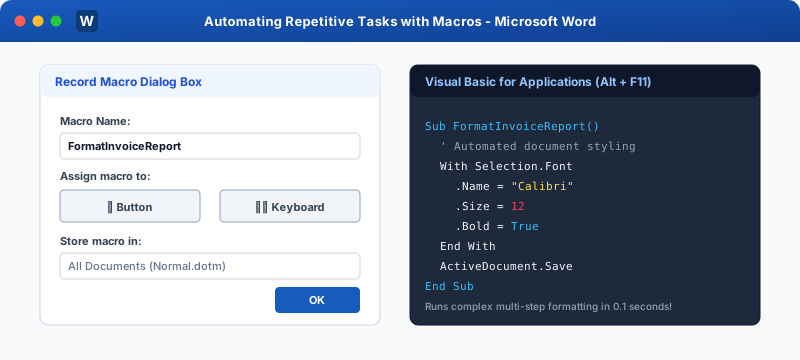
Practical Macro Examples Behind every recorded macro in Microsoft Word is Visual Basic for Applications (VBA) code. Pressing Alt + F11 opens the VBA Integrated Development Environment (IDE), allowing you to inspect, fine-tune, and supercharge your macros.
Practical VBA Macro Scripts in Microsoft Word Recipe 1: The "Clean Pasted Web Text" Macro When text is pasted from websites, it often contains unwanted formatting, hyperlinks, double spaces, and grey background fills. This macro strips everything and standardizes the text in one click:
1 Sub CleanPastedText()
2 ' Strips character and paragraph formatting
3 Selection.ClearFormatting
4 Selection.Font.Name = "Calibri"
5 Selection.Font.Size = 11
6 Selection.Font.ColorIndex = wdBlack
7 Selection.ParagraphFormat.LineSpacingRule = wdLineSpaceSingle
8 Selection.ParagraphFormat.SpaceAfter = 6
9 Selection.ParagraphFormat.Alignment = wdAlignParagraphJustify
10 End Sub
Automatically injects the standard corporate footer with file path, date, and page numbers across all sections:
1 Sub AddCorporateFooter()
2 Dim sec As Section
3 For Each sec In ActiveDocument.Sections
4 With sec.Footers(wdHeaderFooterPrimary).Range
5 .Text = "Confidential - MSK Institute | Printed on: " & Format(Date, "dd-mmm-yyyy")
6 .Font.Name = "Segoe UI"
7 .Font.Size = 9
8 .Font.ColorIndex = wdGray50
9 .ParagraphFormat.Alignment = wdAlignParagraphCenter
10 End With
11 Next sec
12 End Sub
Recipe 3: The 1-Click "Export Clean PDF" Macro Exports the active document as a high-resolution PDF in the same folder with the same file name, without going through Export menus:
1 Sub QuickExportPDF()
2 Dim pdfPath As String
3 pdfPath = Replace(ActiveDocument.FullName, ".docx", ".pdf")
4 pdfPath = Replace(pdfPath, ".docm", ".pdf")
5 ActiveDocument.ExportAsFixedFormat OutputFileName:=pdfPath, _
6 ExportFormat:=wdExportFormatPDF, OpenAfterExport:=True
7 End Sub
How to Paste VBA Code into Word 1 Press Alt + F11 to open the VBA Editor.
2 In the Project Explorer on the left, double-click Normal > Modules > NewMacros .
3 Paste the code at the bottom of the window.
4 Press Ctrl + S to save. Close the editor.
5 The macro is now ready to run from your Macros dialog or custom button!
Interactive Quiz • Knowledge Check
Multiple Choice Questions What is the keyboard shortcut to launch the Visual Basic for Applications (VBA) Editor in MS Word?
A Alt + F1
B Alt + F11
C Ctrl + F11
D Shift + F9
In VBA code, which object represents the currently selected text on the document canvas?
A ActiveSheet
B Selection
C RangeText
D CurrentLine
What programming language underlies recorded macros in Microsoft Office applications?
A JavaScript
B Python
C Visual Basic for Applications (VBA)
D C++
In the VBA Project window, which module store ensures code runs across all documents on your system?
A Project.docx
B Normal > Modules > NewMacros
C System32
D ThisDocument
What VBA method exports an active Word document into a standard PDF file programmatically?
A Document.PrintToPDF
B ActiveDocument.ExportAsFixedFormat
C Document.ConvertToPDF
D SaveAsPDF()
 Click to Zoom