Writing Professional GitHub READMEs & Badges0%

Writing Professional GitHub READMEs & Badges

Beginner12 min readUpdated: Jul 11, 2026
Study Materials

A project's README.md is the digital storefront of your open-source repository. When engineers, recruiters, or open-source contributors land on your GitHub repository, the README is the first thing they see. A polished, comprehensive README can transform an unnoticed library into a project with thousands of GitHub stars!

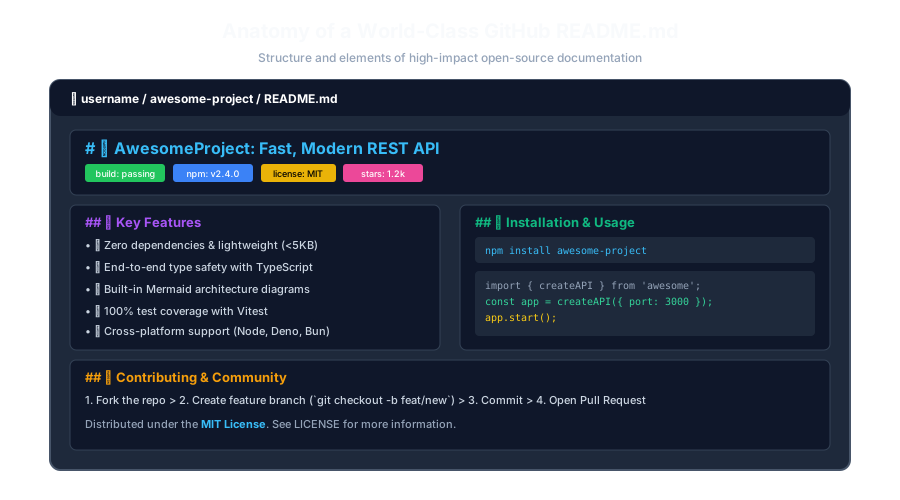
Anatomy of a World-Class GitHub READMEClick to Zoom
Anatomy of a World-Class GitHub README

1. Essential Sections of a High-Impact README

A production-grade open-source README typically includes the following structured sections:

  1. 1
    Hero Header & Project Title: Concise one-liner describing the problem the project solves.
  2. 2
    Status Badges (Shields.io): Visual metrics for build status, npm version, license, and test coverage.
  3. 3
    Hero Image / Animated GIF Demo: Shows the application or CLI tool in action.
  4. 4
    Key Features Grid: Bulleted list highlighting key technical advantages.
  5. 5
    Tech Stack & Architecture: Tools and frameworks used (often with a Mermaid diagram).
  6. 6
    Quickstart / Installation Guide: Step-by-step shell commands to get running in under 2 minutes.
  7. 7
    Code Usage Example: Minimal copy-pasteable script showing the primary API.
  8. 8
    Contributing Guidelines & License: Information on how to submit PRs and copyright terms.

2. Adding Dynamic Badges with Shields.io

Badges provide immediate social proof and build confidence. Shields.io provides standard SVG status badges:
Markdown
[![Build Status](https://img.shields.io/github/actions/workflow/status/facebook/react/ci.yml?branch=main)](https://github.com/facebook/react/actions)
[![npm version](https://img.shields.io/npm/v/react.svg?color=blue)](https://www.npmjs.com/package/react)
[![License: MIT](https://img.shields.io/badge/License-MIT-yellow.svg)](https://opensource.org/licenses/MIT)
[![GitHub Stars](https://img.shields.io/github/stars/facebook/react?style=social)](https://github.com/facebook/react)

3. Professional README Template (Copy & Adapt)

Markdown
# 🚀 FastAuth: Blazing Fast JWT Authentication
 
> A zero-dependency, type-safe authentication library for Node.js and Bun.
 
[![npm version](https://img.shields.io/npm/v/fastauth)](https://npmjs.com)
[![License: MIT](https://img.shields.io/badge/License-MIT-blue)](LICENSE)
 
---
 
## ✨ Features
-**Sub-millisecond verification:** 5x faster than jsonwebtoken.
- 🔒 **Secure by default:** Automated timing attack protection.
- 📦 **Zero dependencies:** Pure TypeScript with zero npm bloat.
 
## 📦 Installation

npm install fastauth

Output
 
## 🚀 Quickstart

import { FastAuth } from 'fastauth';

const auth = new FastAuth({ secret: process.env.JWT_SECRET }); const token = await auth.sign({ userId: 123 }); console.log('Generated Token:', token);

Output
 
## 🤝 Contributing
Contributions are welcome! Please read [CONTRIBUTING.md](CONTRIBUTING.md) before opening a PR.
 
## 📄 License
MIT © [Your Name](https://github.com/username)

Multiple Choice Questions

1. What is the standard filename for a repository's homepage documentation in GitHub?

A. index.html B. README.md C. config.json D. home.txt Answer: B Explanation: GitHub automatically looks for README.md in the root of the repository to render as the project overview page.


2. Which free online service is universally used to generate dynamic status badges for GitHub READMEs?

A. Shields.io B. Canva C. Google Maps D. Dropbox Answer: A Explanation: Shields.io serves dynamic, concise, and customizable SVG status badges for open-source repositories.


3. Why is including an animated GIF or screenshot beneficial in a GitHub README?

A. It makes the file 100 times larger B. It provides immediate visual proof of how the software functions before a developer invests time installing it C. It deletes broken links D. GitHub requires all READMEs to have videos Answer: B Explanation: Visual demos allow users to instantly grasp the product's UX and capabilities within seconds of landing on the page.


4. What license badge is appropriate for a project released under the MIT Open Source License?

A. ![License: MIT](...) B. Copyright All Rights Reserved C. Classified Government Document D. Non-Disclosure Agreement Answer: A Explanation: An open-source MIT license badge informs potential users that the software is free to use, modify, and distribute.


5. Where should step-by-step guidelines for submitting code improvements to an open-source project typically be documented?

A. CONTRIBUTING.md B. .gitignore C. package-lock.json D. .env.local Answer: A Explanation: CONTRIBUTING.md is the standard file linked in READMEs to guide developers on pull request etiquette and test procedures.


Next Lesson

Issue & Pull Request Templates in GitHub

Continue learning with hands-on practice, examples, and exercises in the upcoming topic.

Practice Quiz

Test your understanding of this lesson with 5 questions. Each question has one correct answer.

PrevNext