Relational Joins with pd.merge (Inner, Left, Right, Outer)
Relational Joins with pd.merge (Inner, Left, Right, Outer)
Reading Time: 8 Mins | Level: Beginner to Advanced
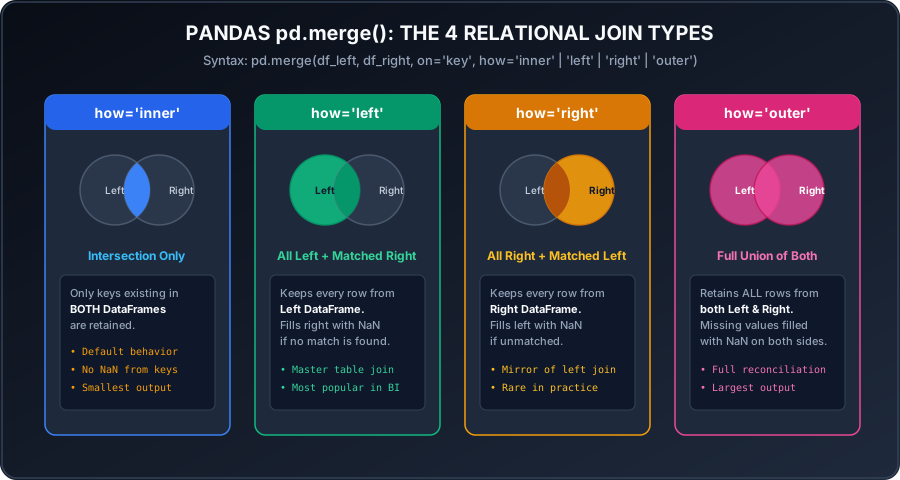 Click to Zoom
1. What is Relational Merging?
While concat() simply glues tables together, pd.merge() combines DataFrames based on matching values in common key columns—identically to an SQL JOIN or Excel XLOOKUP / VLOOKUP.
2. The 4 Relational Join Types
1. Inner Join (how='inner' - Default)
Keeps only the rows where the join key exists in both tables (the intersection):
2. Left Join (how='left')
Keeps all rows from the left table. If no match exists in the right table, right-side columns are filled with NaN:
3. Right Join (how='right')
Keeps all rows from the right table. Customer 5 (who is not in the customer master table) is included:
4. Full Outer Join (how='outer')
Keeps all rows from both tables, unioning unmatched records with NaN:
3. Merging on Differently Named Columns
When the left table calls the key client_id and the right table calls it cust_number:
4. Detecting Unmatched Records with indicator=True
To audit which table contributed each record (essential for data reconciliation):
Output:
Multiple Choice Questions
pd.merge(df1, df2, on='key')?indicator=True add to the merged DataFrame?Reshaping Data: Melt, Stack & Unstack
Continue learning with hands-on practice, examples, and exercises in the upcoming topic.
Related Lessons
| Previous Lesson | Next Lesson |
|---|---|
| Concatenating DataFrames (pd.concat) | Reshaping Data: Melt, Stack & Unstack |
Practice Quiz
Test your understanding of this lesson with 5 questions. Each question has one correct answer.