What is Pandas & Core Architecture
What is Pandas & Core Architecture
Reading Time: 8 Mins | Level: Beginner to Advanced
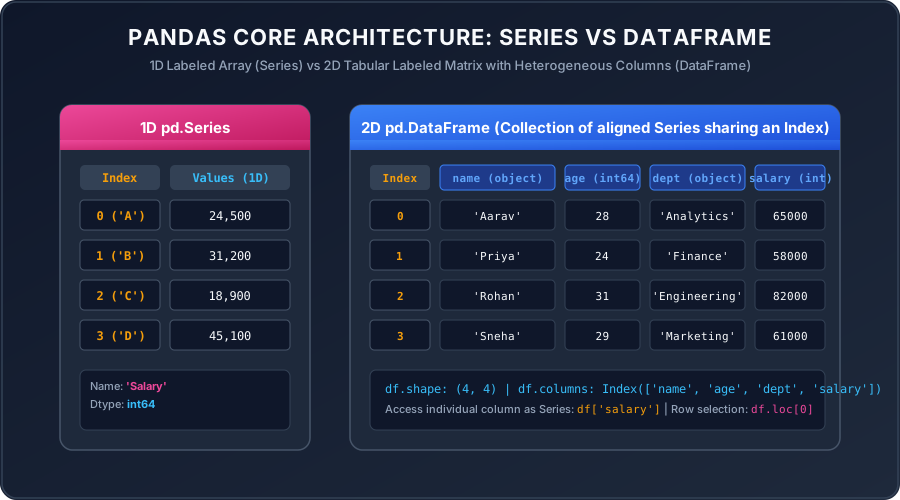 Click to Zoom
1. What is Pandas? (Introduction & Purpose)
Pandas is the foundational open-source Python library used worldwide for data manipulation, data wrangling, cleaning, and exploratory data analysis (EDA). Built directly on top of NumPy, Pandas introduces intuitive, flexible, and high-performance two-dimensional labeled data structures that bring the flexibility of SQL tables and Microsoft Excel spreadsheets directly into Python.
In simple Indian English terms:
Why Pandas Over Raw Python or Excel?
- Scale: While Excel struggles with beyond 100,000 rows, Pandas handles millions of records effortlessly using optimized C-extensions.
- Automation & Pipelines: Instead of manually clicking buttons in Excel every Monday, a Pandas script automates data extraction, cleaning, and reporting with one click.
- Heterogeneous Data: Unlike pure NumPy arrays where all elements must share the exact same datatype, a Pandas table can contain integers, floats, dates, text, and booleans across different columns simultaneously.
2. Core Data Structures: Series vs DataFrame vs Index
Pandas is architected around three foundational building blocks:
1. pd.Series (1-Dimensional Labeled Array)
A Series is a one-dimensional array capable of holding any data type (integers, strings, floating-point numbers, Python objects). It consists of two parallel arrays:
- 1The Values: The actual data (stored as a continuous NumPy array).
- 2The Index: An explicit array of data labels mapping to each value.
Output:
2. pd.DataFrame (2-Dimensional Labeled Tabular Matrix)
A DataFrame is a two-dimensional, size-mutable, and potentially heterogeneous tabular data structure with labeled axes (rows and columns). You can think of a DataFrame as a dictionary of Series objects sharing a common Index:
Output:
3. pd.Index (Immutable Axis Labels)
The Index object stores axis labels for Series and DataFrames. It behaves like an immutable ordered multiset, enabling ultra-fast $O(1)$ lookups, relational alignments, and slice operations.
3. The Two Coordinate Axes: axis=0 vs axis=1
One of the most frequent points of confusion for beginners is understanding axis direction:
axis=0(Rows / Vertical direction): Operations run down the rows. For example,df.mean(axis=0)computes the mean of each column down all rows.axis=1(Columns / Horizontal direction): Operations run across the columns. For example,df.drop('Department', axis=1)drops the vertical column.
4. Key Takeaways & Best Practices
- Always import Pandas using the standard community alias:
import pandas as pd. - A DataFrame is simply a collection of Series sharing a single index.
- Operations in Pandas are vectorized by default—avoid using Python
forloops when calculating columns.
Multiple Choice Questions
axis=0 represent?Pandas Installation & Environment Setup
Continue learning with hands-on practice, examples, and exercises in the upcoming topic.
Related Lessons
| Previous Lesson | Next Lesson |
|---|---|
| None | Pandas Installation & Environment Setup |
Practice Quiz
Test your understanding of this lesson with 5 questions. Each question has one correct answer.