GroupBy Mechanics: Split-Apply-Combine0%
GroupBy Mechanics: Split-Apply-Combine
Beginner12 min read•Updated: Jul 11, 2026
GroupBy Mechanics: Split-Apply-Combine
Reading Time: 8 Mins | Level: Beginner to Advanced
 Click to Zoom
1. What is GroupBy?
The GroupBy operation is one of the most fundamental workflows in data analytics. In SQL, it corresponds to GROUP BY; in Excel, it corresponds to creating a PivotTable.
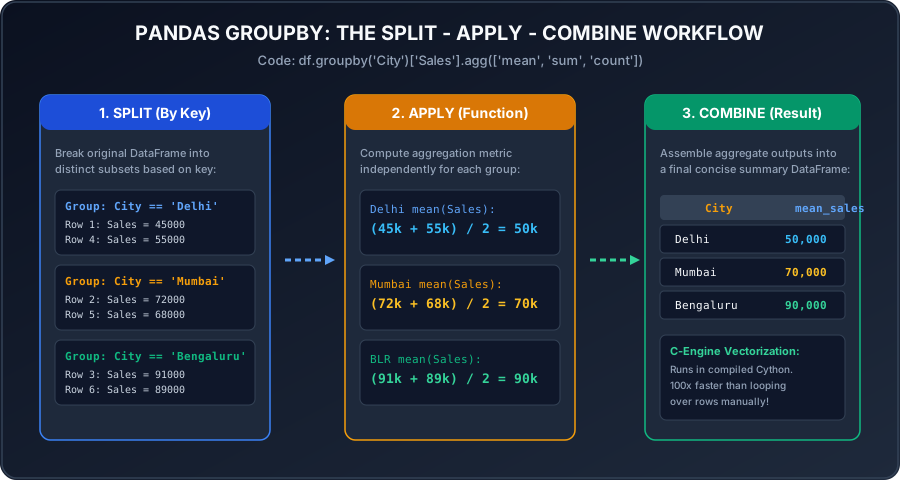
The GroupBy architecture follows the Split-Apply-Combine paradigm:
- 1Split: Divide the DataFrame into groups based on keys (e.g., City, Department, Product Category).
- 2Apply: Apply an aggregation function independently to each group (e.g.,
mean,sum,count,std). - 3Combine: Merge the individual group summaries back into a single clean DataFrame.
2. Basic GroupBy Aggregation
Python
import pandas as pd
data = {
'Region': ['North', 'South', 'North', 'South', 'East', 'North'],
'Sales_Person': ['Amit', 'Priya', 'Rohan', 'Sneha', 'Deepak', 'Kavita'],
'Sales': [45000, 72000, 55000, 68000, 39000, 61000],
'Bonus': [4500, 7000, 5000, 6500, 3500, 6000]
}
df = pd.DataFrame(data)
# Calculate total sales by Region
region_sales = df.groupby('Region')['Sales'].sum()
print(region_sales)
Output:
Output
Region
East 39000
North 161000
South 140000
Name: Sales, dtype: int64
3. Keeping the Group Key as a Normal Column (as_index=False)
By default, Pandas sets the grouping key as the index of the output. In modern data pipelines, keeping it as a normal column is usually preferred:
Python
# Notice as_index=False keeps 'Region' as a normal column!
region_summary = df.groupby('Region', as_index=False)['Sales'].mean()
print(region_summary)
4. Grouping by Multiple Columns
Python
# Group by Region AND Department
multi_group = df.groupby(['Region', 'Sales_Person'])['Sales'].sum()
5. Iterating Through Groups
A GroupBy object is an iterable of (group_name, group_dataframe) tuples:
Python
for region_name, group_df in df.groupby('Region'):
print(f"=== Region: {region_name} (Total Rows: {len(group_df)}) ===")
print(group_df[['Sales_Person', 'Sales']])
Interactive Quiz
Multiple Choice Questions
Question 1
What are the three phases of the GroupBy mechanism in Pandas?
Question 2
What does setting
as_index=False accomplish in df.groupby('City', as_index=False)?Question 3
What is returned when you call
df.groupby('Category') without an aggregation function?Question 4
Which code snippet computes the average sales for each department?
Question 5
What does
df.groupby('Category').size() return?Next Lesson
Multiple Aggregations & NamedAgg
Continue learning with hands-on practice, examples, and exercises in the upcoming topic.
Related Lessons
| Previous Lesson | Next Lesson |
|---|---|
| Renaming Columns, Replacing Values & Sorting | Multiple Aggregations & NamedAgg |
Practice Quiz
Test your understanding of this lesson with 5 questions. Each question has one correct answer.