The Rules of NumPy Broadcasting Explained0%

The Rules of NumPy Broadcasting Explained

Beginner12 min readUpdated: Jul 11, 2026
Study Materials

The Rules of NumPy Broadcasting Explained

Broadcasting is NumPy's most powerful and elegant mechanism. It describes how NumPy treats arrays with different shapes during arithmetic operations. Subject to certain constraints, the smaller array is "broadcast" across the larger array so that they have compatible shapes—without actually copying data in memory.
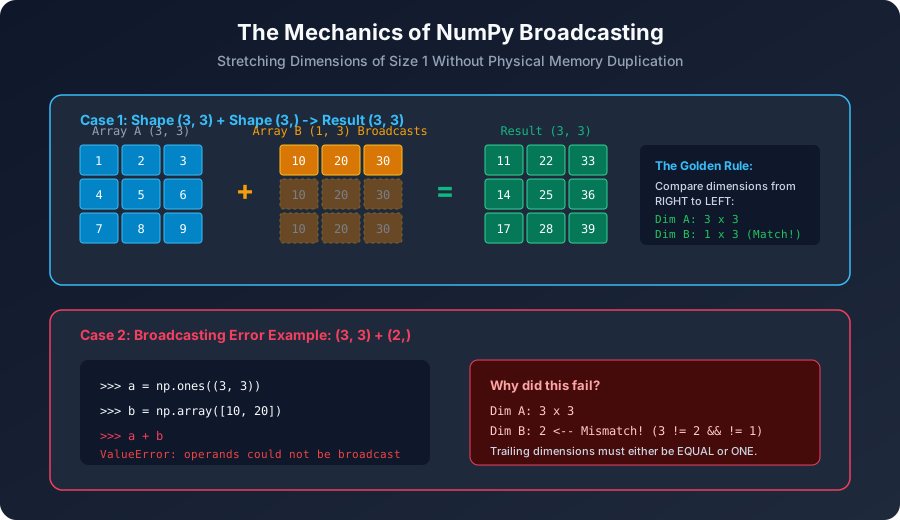
NumPy Broadcasting MechanicsClick to Zoom
NumPy Broadcasting Mechanics

1. The Core Motivation: Why Broadcasting Matters

Consider adding a scalar offset to every row of a matrix, or normalizing columns by subtracting their mean:

Python
import numpy as np
 
# 3x3 matrix
matrix = np.array([[10, 20, 30],
[40, 50, 60],
[70, 80, 90]])
 
# Add scalar 5 to every element
result = matrix + 5
print("Matrix + 5:
", result)

Here, the scalar 5 was automatically broadcast across all 9 elements. But what happens when adding a 1D vector to a 2D matrix? What shapes are allowed, and what shapes cause errors?


2. The Two Formal Rules of Broadcasting

When operating on two arrays, NumPy compares their shapes element-wise, starting from the trailing (rightmost) dimensions and working backwards to the left.

Two dimensions are compatible if and only if:

  1. 1
    They are equal, OR
  2. 2
    One of them is 1.

If neither condition is met, NumPy raises a: ValueError: operands could not be broadcast together with shapes ...

When either dimension is 1, the array with dimension size 1 acts as if it were stretched along that axis to match the larger dimension.


3. Step-by-Step Broadcasting Walkthroughs

Example 1: Matrix + 1D Row Vector

  • Matrix $A$ shape: (3, 3)
  • Vector $B$ shape: (3,)

Alignment Process:

Output
Step 1: Align from the right:
A: 3 x 3
B: 3 (Prepend 1 to B: shape becomes (1, 3))
 
Step 2: Compare trailing dimension:
A has 3, B has 3 -> Compatible (equal)
 
Step 3: Compare leading dimension:
A has 3, B has 1 -> Compatible (one of them is 1)
 
Result shape: (3, 3)
Python
A = np.array([[1, 2, 3],
[4, 5, 6],
[7, 8, 9]])
B = np.array([10, 20, 30]) # shape (3,)
 
# B is broadcast across all 3 rows of A:
print("A + B:
", A + B)

Output:

Output
A + B:
[[11 22 33]
[14 25 36]
[17 28 39]]

Example 2: Matrix + Column Vector

What if we want to add a column vector of shape (3, 1) to matrix $A$?

Output
A: 3 x 3
C: 3 x 1
 
Trailing dimension: A has 3, C has 1 -> Compatible (1 stretches to 3)
Leading dimension: A has 3, C has 3 -> Compatible (equal)
 
Result shape: (3, 3)
Python
C = np.array([[100],
[200],
[300]]) # shape (3, 1)
 
print("A + C:
", A + C)

Output:

Output
A + C:
[[101 102 103]
[204 205 206]
[307 308 309]]

Example 3: Outer Addition via 2D Broadcasting

Broadcasting a column vector of shape (4, 1) with a row vector of shape (1, 3):

Output
Row vector: 1 x 3
Col vector: 4 x 1
-----------------------
Result shape: 4 x 3
Python
col = np.array([1, 2, 3, 4])[:, np.newaxis] # (4, 1)
row = np.array([10, 20, 30])[np.newaxis, :] # (1, 3)
 
outer_grid = col * row
print("4x3 Outer Multiplication Grid:
", outer_grid)

4. Incompatible Shapes (When Broadcasting Fails)

Consider:

  • Array $X$ shape: (3, 4)
  • Array $Y$ shape: (3,)
Output
Alignment from right:
X: 3 x 4
Y: 3
Trailing comparison: 4 vs 3 -> Neither is 1, and they are NOT equal!
BROADCASTING FAILS!
Python
X = np.ones((3, 4))
Y = np.ones(3)
 
try:
result = X + Y
except ValueError as e:
print("Caught Error:", e)
# ValueError: operands could not be broadcast together with shapes (3,4) (3,)

Fixing the mismatch: If you intend to add $Y$ to each row along the 3 rows of $X$, reshape $Y$ into a column vector of shape (3, 1):

Python
fixed_result = X + Y[:, np.newaxis] # shape (3, 4) + (3, 1) -> SUCCESS!
print("Fixed result shape:", fixed_result.shape)

5. Memory Efficiency: Stride Tricks

Does broadcasting allocate memory for the stretched array? No!

NumPy achieves broadcasting by setting the memory stride along the stretched axis to 0. A stride of 0 tells the CPU: "When moving along this dimension, do not advance the memory pointer; re-read the exact same memory address."

This means broadcasting an array of 1000 numbers across 1,000,000 rows consumes zero additional bytes of RAM!


Multiple Choice Questions

1. In what order does NumPy compare dimensions when determining broadcasting compatibility?

A. Left-to-right starting from dimension 0 B. Right-to-left starting from trailing dimensions C. In descending order of dimension size D. Randomly depending on memory layout Answer: B Explanation: NumPy compares shapes starting from the rightmost (trailing) dimensions and proceeds leftward.


2. Under what two conditions are two dimensions considered compatible for broadcasting?

A. Both dimensions are powers of 2, or both are even B. The dimensions are equal, or one of them is 1 C. One dimension is a multiple of the other D. The sum of dimensions is less than 100 Answer: B Explanation: The fundamental broadcasting rule states that two dimensions are compatible if they are equal or if one of them has a size of 1.


3. What is the resulting shape when broadcasting an array of shape (5, 1, 4) with an array of shape (3, 4)?

A. (5, 3, 4) B. (5, 4) C. (15, 4) D. ValueError: incompatible shapes Answer: A Explanation: Aligning from the right: (5, 1, 4) and ( , 3, 4). Trailing dimension: 4 and 4 match. Middle dimension: 1 and 3 match (1 stretches to 3). Leading dimension: 5 and 1 match (implied 1 stretches to 5). Result shape is (5, 3, 4).


4. Why does broadcasting consume virtually zero additional memory?

A. It compresses data using gzip in RAM B. It sets the memory stride of the broadcast dimension to 0 bytes C. It evaluates expressions lazily on disk D. It caches results in CPU registers Answer: B Explanation: By assigning a stride of 0 bytes to the stretched dimension, NumPy repeatedly references the same memory address without allocating duplicate buffers.


5. Why does adding an array of shape (4, 3) to an array of shape (4,) fail with a ValueError?

A. Arrays must have identical dimensions B. The trailing dimension of the first array (3) does not match the trailing dimension of the second array (4), and neither is 1 C. 1D arrays can never be added to 2D arrays D. Shape (4,) cannot be converted to a matrix Answer: B Explanation: Comparing trailing dimensions: 3 vs 4. Because neither is equal nor 1, the shapes are incompatible according to broadcasting rules. (To fix, reshape the second array to (4, 1)).


Next Lesson

Universal Functions (ufuncs), Trigonometry & Logarithms

Continue learning with hands-on practice, examples, and exercises in the upcoming topic.

Practice Quiz

Test your understanding of this lesson with 5 questions. Each question has one correct answer.

PrevNext