MSK Institute • Shikohabad
Loading Page Content...
Preparing courses, live labs, and learning resources.सामग्री लोड हो रही है, कृपया प्रतीक्षा करें...
Connecting serverPlease wait...
💻 Practical Labs🚀 Free Demo📜 Verified Certificates
Preparing courses, live labs, and learning resources.सामग्री लोड हो रही है, कृपया प्रतीक्षा करें...
In machine learning models, computer vision pipelines, and matrix algebra, manipulating the dimensions and geometric layout of arrays is a ubiquitous daily requirement. For instance, a neural network layer may require flattening a 2D image matrix of (28, 28) pixels into a 1D vector of 784 features, or batching 1000 samples into mini-batches of (32, 10, 10).
NumPy's reshape() method allows you to change the shape of an array without changing its underlying data or reallocating memory.
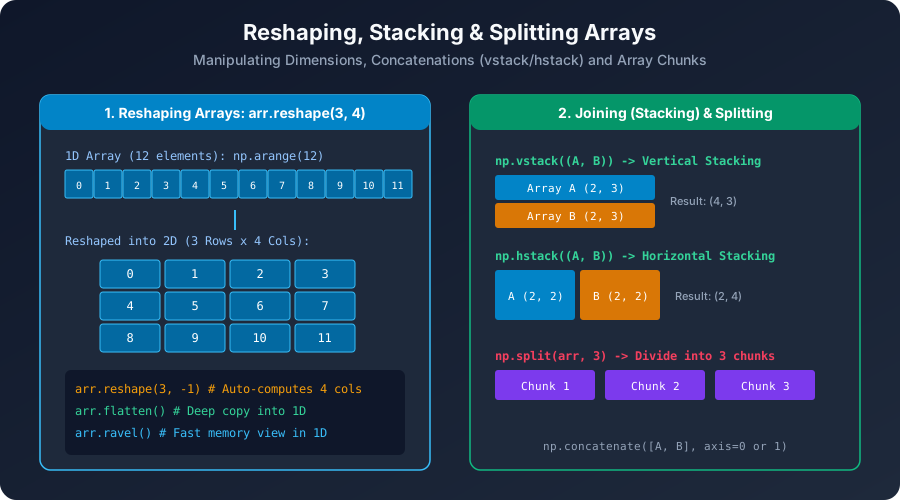 Click to Zoom
The cardinal rule of reshaping is that the total number of elements (the product of dimension sizes) must remain strictly identical before and after the reshape operation:
$$\prod_{i} \text{old\_shape}[i] = \prod_{j} \text{new\_shape}[j] = \text{total\_elements}$$
If you attempt to reshape an array of 12 elements into a shape whose product is not 12 (e.g. (3, 5) which requires 15 elements), NumPy raises an exception:
-1Calculating dimension sizes manually becomes tedious and error-prone when processing dynamic datasets with variable batch sizes. NumPy allows you to specify -1 for exactly one dimension. NumPy will automatically deduce the required size for that dimension by dividing the total element count by the product of the remaining dimensions:
-1 for at most one dimension. Specifying arr.reshape(-1, -1) will raise ValueError: can only specify one unknown dimension.When reshaping, the order in which elements are read from and written to the dimensions matters:
order='C', Default): Row-major order. The last index changes fastest (rows are filled left-to-right before moving to the next row). Matches C, C++, and Python conventions.order='F'): Column-major order. The first index changes fastest (columns are filled top-to-bottom before moving to the next column). Matches Fortran, MATLAB, and R conventions.Output:
reshape() Return a View or a Copy?In almost all standard cases where the memory buffer is contiguous, reshape() returns a VIEW of the original data. Modifying elements of the reshaped array modifies the original array:
Output:
reshape() may be forced to allocate a copy to satisfy the new stride layout.arr.reshape(new_shape)?-1 in a single reshape() call?np.arange(24).reshape(2, -1, 3)?reshape() if the order parameter is omitted?arr.reshape(...) return?Continue learning with hands-on practice, examples, and exercises in the upcoming topic.
Test your understanding of this lesson with 5 questions. Each question has one correct answer.