Fancy Indexing with Integer Arrays0%

Fancy Indexing with Integer Arrays

Beginner12 min readUpdated: Jul 11, 2026
Study Materials

Fancy Indexing with Integer Arrays

In NumPy terminology, Fancy Indexing refers to indexing an array using arrays or sequences of integer indices rather than basic integer scalars or slice objects (start:stop:step).

While basic slicing allows you to extract regularly spaced sub-grids, fancy indexing provides complete freedom to access, reorder, or duplicate arbitrary elements across any dimension.
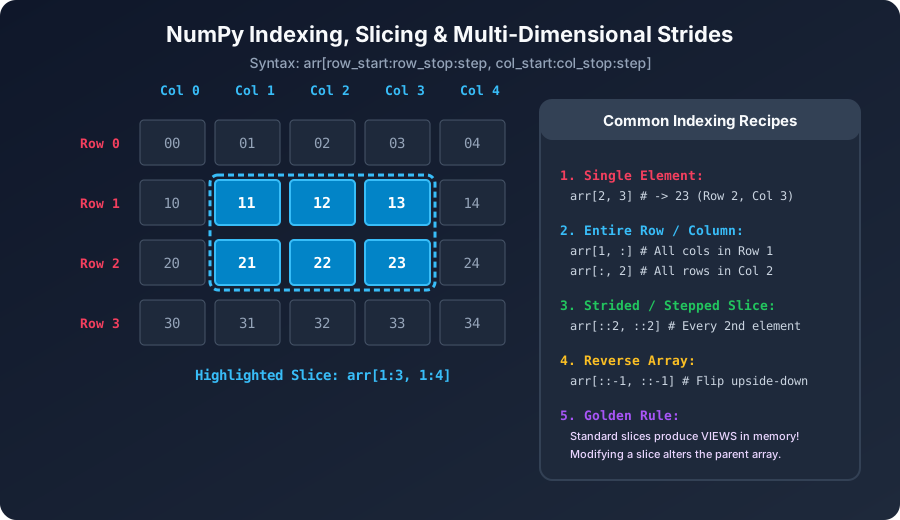
NumPy Indexing and SlicingClick to Zoom
NumPy Indexing and Slicing

1. 1D Fancy Indexing

To select elements at non-contiguous positions, pass a Python list or NumPy array of integers representing the desired target indices:

Python
import numpy as np
 
data = np.array([100, 200, 300, 400, 500, 600, 700, 800])
 
# Select elements at index 1, 4, and 6
indices = [1, 4, 6]
subset = data[indices]
print("Selected elements:", subset)
 
# You can reorder, repeat, or reverse indices freely:
repeated = data[[0, 0, 7, 2, 7]]
print("Repeated selection:", repeated)
 
# Negative integers count backward from the end:
tail_elements = data[[-1, -3]]
print("Negative indices:", tail_elements)

Output:

Output
Selected elements: [200 500 700]
Repeated selection: [100 100 800 300 800]
Negative indices: [800 600]

2. Multi-Dimensional Fancy Indexing

When working with 2D or N-dimensional matrices, fancy indexing allows row selection, column selection, or simultaneous point-coordinate extraction.

Selecting Specific Rows:

Python
matrix = np.arange(1, 26).reshape(5, 5)
print("Original 5x5 Matrix:
", matrix)
 
# Extract row 0, row 2, and row 4
rows = matrix[[0, 2, 4]]
print("
Selected Rows (0, 2, 4):
", rows)

Coordinate-Based Indexing vs Rectangular Sub-grids:

When you pass two integer arrays matrix[rows, cols], NumPy pairs the indices element-by-element like coordinates (r0, c0), (r1, c1), (r2, c2), rather than taking a cross-product matrix:

Python
# Extract matrix[0, 1], matrix[2, 3], and matrix[4, 0]
r = [0, 2, 4]
c = [1, 3, 0]
 
points = matrix[r, c]
print("
Extracted points at coordinates:", points)

Output:

Output
Extracted points at coordinates: [ 2 14 21]

If you instead want a rectangular sub-grid (the cross-product of those rows and columns), combine integer slicing with np.ix_():

Python
# Sub-matrix of rows [0, 2] and columns [1, 3]
subgrid = matrix[np.ix_([0, 2], [1, 3])]
print("
Rectangular sub-grid using np.ix_:
", subgrid)

3. Critical Difference: View vs Copy

This is one of the most vital architectural rules in NumPy:

Indexing TechniqueMemory BehaviorModification Effect
Basic Slicing (arr[1:4])Returns a VIEW (shared memory buffer)Modifying view mutates original array
Fancy Indexing (arr[[1, 4]])Returns a COPY (new memory allocation)Modifying copy has NO effect on original
Boolean Masking (arr[arr > 0])Returns a COPY (new memory allocation)Modifying copy has NO effect on original
Python
arr = np.array([10, 20, 30, 40, 50])
 
# Fancy indexing creates an independent copy
copy_subset = arr[[1, 2]]
copy_subset[0] = 999
 
print("Original arr:", arr) # Unchanged: [10, 20, 30, 40, 50]
print("Copy subset:", copy_subset) # [999, 30]

4. In-Place Mutation with Fancy Indexing

Even though reading with fancy indexing yields a copy, assigning to fancy-indexed positions modifies the original array in-place:

Python
board = np.zeros((4, 4), dtype=int)
 
# Set specific coordinates to 1
target_rows = [0, 1, 2, 3]
target_cols = [3, 2, 1, 0]
 
board[target_rows, target_cols] = 1
print("Board with anti-diagonal 1s:
", board)

Caution: Repeated Index Assignment Pitfall

If an index appears multiple times during in-place assignment, the assignment happens sequentially, but with operators like +=, repeated increments might only execute once unless you use np.add.at():

Python
counter = np.zeros(5, dtype=int)
indices = [1, 1, 1, 3]
 
# Direct addition does NOT add 3 times!
counter[indices] += 1
print("Direct += assignment:", counter) # [0 1 0 1 0] -> incremented only once!
 
# Correct way for repeated index accumulation:
counter = np.zeros(5, dtype=int)
np.add.at(counter, indices, 1)
print("np.add.at() result:", counter) # [0 3 0 1 0] -> incremented 3 times!

Multiple Choice Questions

1. What does fancy indexing in NumPy return when selecting elements from an array?

A. Always a view sharing the original memory buffer B. Always a copy with a newly allocated memory buffer C. A view if the indices are sorted, otherwise a copy D. A memory-mapped file reference Answer: B Explanation: Fancy indexing (using integer arrays or lists of indices) always creates and returns a brand new array copy in memory, unlike basic slicing which returns a view.


2. Given matrix = np.arange(16).reshape(4, 4), what is the output of matrix[[0, 1], [2, 3]]?

A. A 2x2 sub-matrix containing rows 0,1 and columns 2,3 B. A 1D array of two elements: [matrix[0, 2], matrix[1, 3]] C. A 1D array of four elements D. A ValueError due to mismatched dimensions Answer: B Explanation: Passing two 1D integer arrays pairs the row and column coordinates element-by-element, evaluating to points (0, 2) and (1, 3).


3. Which NumPy function constructs an open mesh to extract a rectangular sub-grid using fancy indexing?

A. np.meshgrid B. np.ix_ C. np.ravel_multi_index D. np.c_ Answer: B Explanation: np.ix_() takes 1D integer sequences and creates an open multi-dimensional mesh suitable for extracting rectangular cross-product sub-grids.


4. If arr = np.array([10, 20, 30]) and you execute idx = [0, 1]; sub = arr[idx]; sub[0] = 99, what is the value of arr[0]?

A. 99 B. 10 C. 0 D. None Answer: B Explanation: Because fancy indexing creates a copy, mutating sub[0] modifies only the newly allocated copy. The original arr[0] remains 10.


5. Why does counter[[0, 0, 0]] += 1 fail to increment counter[0] by 3?

A. Floating point roundoff error B. Python syntax disallows duplicated list indices C. The values are extracted, buffered, incremented once, and written back to index 0 D. NumPy automatically deduplicates index lists Answer: C Explanation: In standard assignment syntax a[idx] += 1, the target values are read into a temporary buffer, incremented by 1, and assigned back to the locations. To perform repeated accumulation at duplicated indices, np.add.at(a, idx, 1) must be used.


Next Lesson

Conditional Selectors: np.where(), np.select() & np.extract()

Continue learning with hands-on practice, examples, and exercises in the upcoming topic.

Practice Quiz

Test your understanding of this lesson with 5 questions. Each question has one correct answer.

PrevNext