MSK Institute • Shikohabad
Loading Page Content...
Preparing courses, live labs, and learning resources.सामग्री लोड हो रही है, कृपया प्रतीक्षा करें...
Connecting serverPlease wait...
💻 Practical Labs🚀 Free Demo📜 Verified Certificates
Preparing courses, live labs, and learning resources.सामग्री लोड हो रही है, कृपया प्रतीक्षा करें...
Converting Python lists is convenient for small tests, but in production machine learning and scientific simulations, allocating arrays containing millions of pre-initialized cells must be done without allocating Python objects first. NumPy provides specialized built-in memory allocation routines.
np.zeros() allocates a contiguous block of memory and fills every byte with 0:
Common Use Case: Initializing weight matrices, zero-padding convolution masks, or accumulator buffers in numerical simulations.
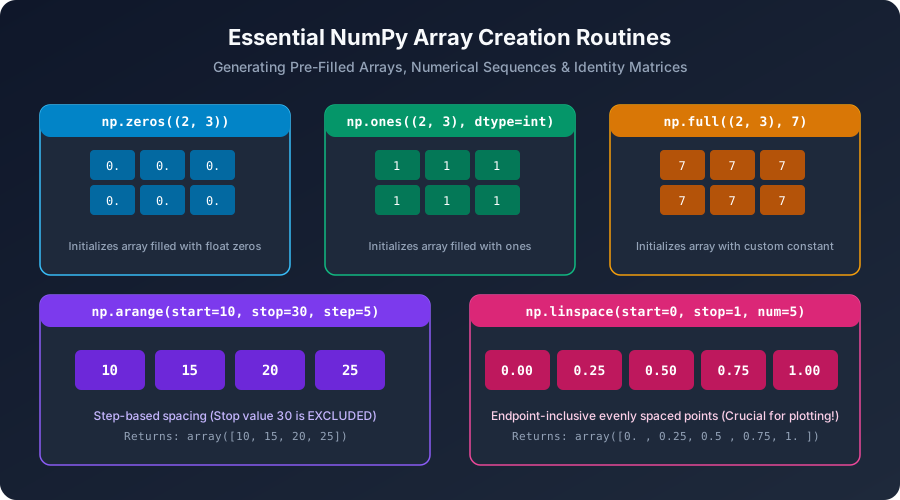 Click to Zoom
np.ones() operates identically to zeros(), but initializes every element to 1:
Common Use Case: Baseline probability priors, bias vectors in neural networks, and multiplier masks.
When you need an array initialized with any arbitrary constant value (e.g., 7, -1, 3.14, or np.nan):
What if you are about to overwrite every single element of an array immediately with data from a disk stream or sensor? Initializing cells to 0 wastes CPU write cycles. np.empty() allocates memory without initializing its values:
np.empty() does not clear memory! The array will contain unpredictable residual bits (garbage values) left behind by other applications. Never read from an empty() array before writing to it!NumPy provides companion routines that mirror the shape and dtype of an existing template array:
Continue learning with hands-on practice, examples, and exercises in the upcoming topic.
Test your understanding of this lesson with 5 questions. Each question has one correct answer.