Capstone Project 1: Designing an Executive Business Pitch Deck
Putting theory into practice is the definitive mark of mastery. In this hands-on capstone project, you will apply typography, layouts, custom Slide Master design, iconography, charts, and cinematic Morph transitions to build an executive 10-slide startup fundraising pitch deck.
Click to Zoom
Capstone Pitch Deck Template
Project Specifications & Architecture
Project Goal: Build an investor-ready 10-slide pitch deck for a fictional technology company: "CloudSync AI - Automated Enterprise Workspace".
Color Palette:
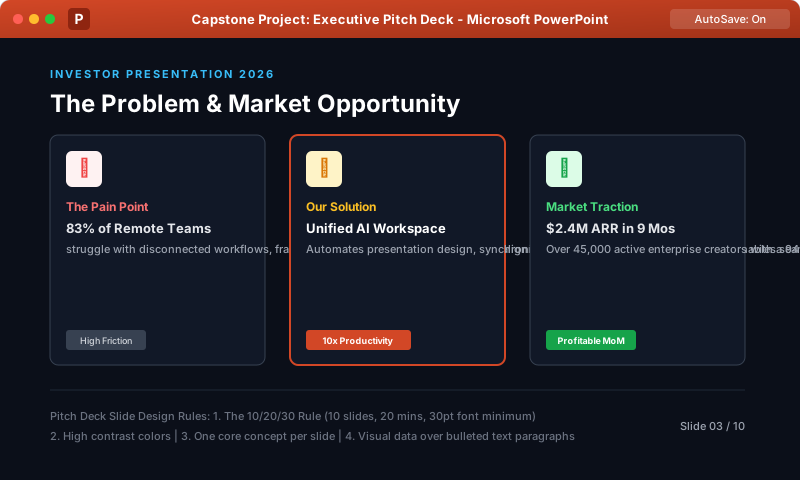
Primary Background: Deep Slate Navy (#0B0F19)
Surface Card Containers: Charcoal (#111827) with subtle border (#374151)
Accent / Brand Color: Electric Orange (#D24726)
Success Metric Color: Emerald Green (#10B981)
Text: Pure White (#FFFFFF) for headings, Muted Silver (#9CA3AF) for body copy
Title Slide: Strong product tagline, company logo, presenter name, date, and confidentiality badge.
2
The Problem: 3 structured cards highlighting current enterprise pain points (wasted hours, fragmented tools, high churn).
3
The Solution: Hero product diagram demonstrating how CloudSync AI solves the pain points in one platform.
4
Market Opportunity (TAM/SAM/SOM): 3 concentric circles or visual callout cards displaying Total Addressable Market ($48B), Serviceable Addressable Market ($14B), and Obtainable Market ($2.8B).
5
Product Features: 4 icon cards using SVG icons and short benefit-driven headlines.
6
Business Model: Clean 3-tier pricing table (Starter, Professional, Enterprise) highlighting the middle tier.
7
Market Traction & Revenue: A native clustered column or line chart demonstrating 180% year-over-year MRR growth.
8
Competitive Advantage: A 2x2 matrix or comparison checkmark table positioning CloudSync AI against legacy competitors.
9
The Team: 3 circular headshot picture placeholders (created via Slide Master or Crop to Shape) with executive bios and past credentials.
10
The Investment Ask & Vision: Clear dollar ask ($3.5M Seed Round), specific fund allocation pie/doughnut chart, contact email, and call-to-action button.
Step-by-Step Build Checklist
Step 1: Slide Master & Branding Setup
1
Go to View > Slide Master.
2
Select the top parent master. Set the background to Solid Fill (#0B0F19).
3
Set Heading font to Segoe UI Semibold and Body font to Segoe UI.
4
Insert a subtle footer disclaimer: CloudSync AI Inc. | Confidential Investor Presentation.
5
Return to Normal View.
Step 2: Designing the 3-Card Problem Slide
1
Insert a new slide with Title Only layout.
2
Title: The Problem & Market Opportunity.
3
Draw 3 rounded rectangles across the canvas.
4
Use Shape Format > Align > Distribute Horizontally to ensure mathematical spacing.
5
Insert red/warning icons on each card with a bold metric (e.g., 83% of remote teams struggle with alignment).
Step 3: Adding the Cinematic Morph Transition
1
Select Slide 2 (The Problem) and press Ctrl + D to duplicate it as Slide 3 (The Solution).
2
On Slide 3, change the title to Our Solution: Unified Intelligent Automation.
3
Shrink the problem cards and shift them to the side, then expand the center card to 250% size, coloring it in brand orange (#D24726).
4
Apply the Morph transition to Slide 3 with Duration: 01.50s.
5
Test with Shift + F5: watch the problem cards glide and transform dynamically into the solution showcase!
Interactive Quiz• Knowledge Check
Multiple Choice Questions
Question 1
In executive pitch deck design, what does the market sizing acronym "TAM" stand for?
Question 2
What presentation design practice ensures that 3 problem cards on a slide have perfectly balanced gaps between them?
Question 3
Why is dark mode styling (#0B0F19 background with white text) frequently chosen for modern technology pitch decks?
Question 4
What is the recommended slide count range for an initial investor presentation pitch deck?
Question 5
Which transition applied between a "Problem" slide and a duplicated "Solution" slide creates a smooth, cinematic shift in object sizes and colors?
Next Lesson
Capstone Project 2: Building an Interactive Non-Linear Quiz Game
Continue learning with hands-on practice, examples, and exercises in the upcoming topic.
 Click to Zoom