MSK Institute • Shikohabad
Loading Page Content...
Preparing courses, live labs, and learning resources.सामग्री लोड हो रही है, कृपया प्रतीक्षा करें...
Connecting serverPlease wait...
💻 Practical Labs🚀 Free Demo📜 Verified Certificates
Preparing courses, live labs, and learning resources.सामग्री लोड हो रही है, कृपया प्रतीक्षा करें...
For decades, INDEX and MATCH has been the gold standard combination for advanced Excel modelers. Unlike VLOOKUP, INDEX and MATCH is immune to inserted or deleted columns, can look to the left, consumes significantly less memory on large datasets, and performs dynamic two-way matrix lookups across rows and columns simultaneously.
Rather than relying on one monolithic function, this technique combines two specialized tools:
+-----------------------------------------------------------------------------------+
| 1. The INDEX Function: |
| Returns the value at a specific coordinate inside a range. |
| Syntax: =INDEX(array, row_num, [col_num]) |
| Example: =INDEX(B2:B100, 5) -> Returns the 5th item in column B. |
+-----------------------------------------------------------------------------------+
| 2. The MATCH Function: |
| Searches for a value and returns its relative POSITION number. |
| Syntax: =MATCH(lookup_value, lookup_array, [match_type]) |
| Example: =MATCH("Rajesh", A2:A100, 0) -> Returns 5 (if Rajesh is on row 5). |
+-----------------------------------------------------------------------------------+ Click to Zoom
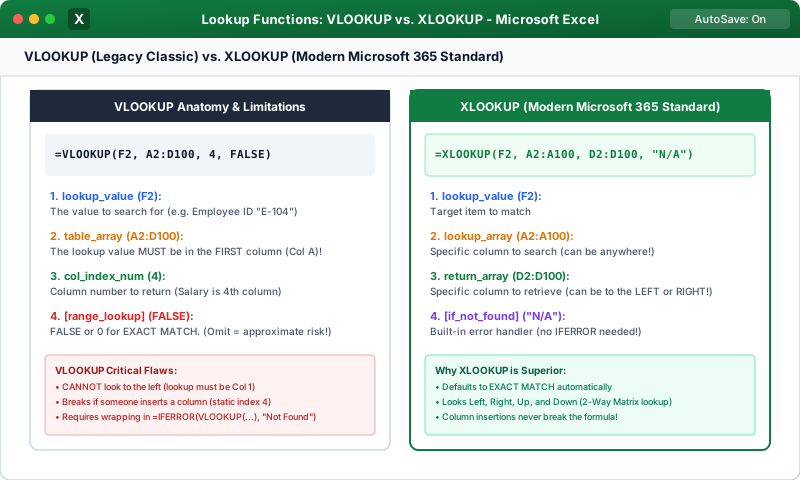
Suppose you need to look up an Employee ID in Column C, but return their Full Name which is in Column A (to the left!). VLOOKUP cannot do this, but INDEX/MATCH does it effortlessly:
What if you have a matrix table where products are in rows and monthly shipping zones are across columns?
To look up 'Product B' in Row and 'Zone 3' in Column:
How it works:
Continue learning with hands-on practice, examples, and exercises in the upcoming topic.
| Previous Lesson | Next Lesson |
|---|---|
| Nested IFs, IFS and SWITCH Functions | XLOOKUP: The Modern Flexible Lookup Function |
Test your understanding of this lesson with 5 questions. Each question has one correct answer.