Converting Markdown to HTML, PDF & Slides (Marp/Pandoc)0%

Converting Markdown to HTML, PDF & Slides (Marp/Pandoc)

Beginner12 min readUpdated: Jul 11, 2026
Study Materials

One of Markdown's greatest superpowers is its format portability. Because Markdown represents semantic document structure in plain text, you can write once and convert into professional printable PDFs, eBook formats (ePub), technical documentation sites, or even animated slide decks!
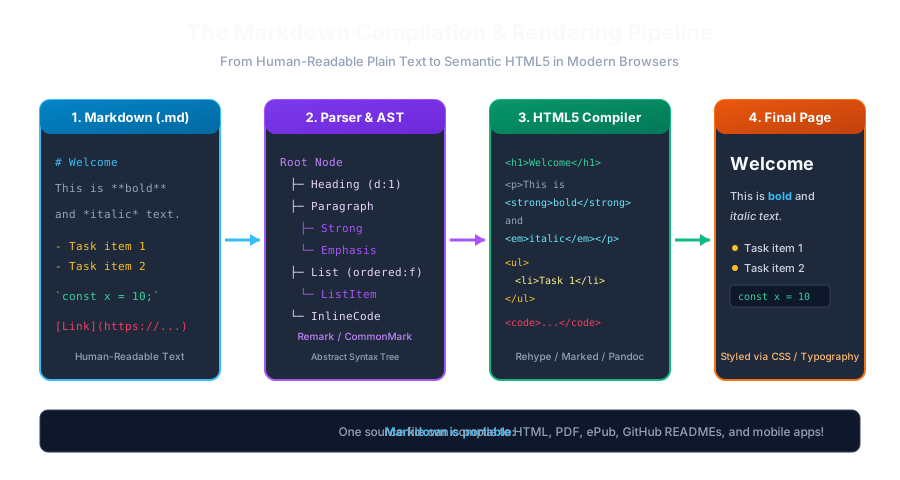
Markdown Compilation PipelineClick to Zoom
Markdown Compilation Pipeline

1. Pandoc (The Universal Document Swiss Army Knife)

Pandoc is the undisputed industry standard command-line document converter. It can convert Markdown into virtually any existing format:

Output
┌─────────> HTML5 / Web Page
├─────────> PDF (via LaTeX / wkhtmltopdf)
Markdown (.md) ───┼─────────> Microsoft Word (.docx)
├─────────> EPUB eBook
└─────────> Man Pages / Plain Text

Common Pandoc Commands:

Bash / Terminal
# 1. Convert Markdown to a standalone HTML5 page with styling:
pandoc README.md -s -o index.html
 
# 2. Convert Markdown to a Microsoft Word document:
pandoc notes.md -o notes.docx
 
# 3. Convert Markdown to a PDF book using wkhtmltopdf:
pandoc book.md -o book.pdf --pdf-engine=wkhtmltopdf

2. Marp (Markdown Presentation Ecosystem)

Creating slides in PowerPoint often wastes hours on manual alignment and font adjustments. Marp allows you to build stunning presentation slide decks entirely in Markdown!

How Marp Works:

Separate your slides using horizontal rules (---):

Markdown
---
marp: true
theme: default
paginate: true
header: "MSK Institute • Web Development"
footer: "© 2026 Er. Sumit Kumar"
---
 
# 🚀 Introduction to Full-Stack Architecture
### Er. Sumit Kumar, MSK Institute
 
---
 
# 📌 Today's Agenda
1. Frontend with Next.js 15
2. Backend APIs with Node & Express
3. Relational Databases with PostgreSQL
4. Deployment on Cloud Infrastructure
 
---
 
# 💡 Why Plain Text Markdown?
- Version controllable with Git
- Portable across all operating systems
- Clean and distraction-free!

Exporting Marp Slides:

With the Marp for VS Code extension, you can export your slide deck to PDF, HTML, or PowerPoint PPTX with a single click!


Multiple Choice Questions

1. Which command-line tool is widely known as the 'Swiss Army Knife' of document conversion?

A. Pandoc B. FFmpeg C. ImageMagick D. Webpack Answer: A Explanation: Pandoc is the premier universal document converter capable of translating Markdown into HTML, PDF, Word, ePub, and more.


2. In Marp presentation syntax, what delimiter separates individual slide pages?

A. Horizontal rules (---) B. Double dollar signs ($$) C. Semicolons (;;;) D. At signs (@@@) Answer: A Explanation: Marp uses standard Markdown horizontal divider lines (---) to demarcate individual slide boundaries.


3. Which Marp YAML frontmatter setting enables automatic slide page numbering?

A. paginate: true B. numbers: on C. count: yes D. page: auto Answer: A Explanation: Setting 'paginate: true' in the Marp frontmatter instructs the slide compiler to render page numbers on each slide.


4. What output formats can Marp export slide decks into?

A. Only plain text B. HTML, PDF, and Microsoft PowerPoint (.pptx) C. MP3 audio files only D. Binary firmware files Answer: B Explanation: Marp exports Markdown presentations to interactive HTML, printable PDF slides, or editable PowerPoint PPTX presentations.


5. What flag tells Pandoc to generate a complete standalone HTML document with <head> and <body> tags?

A. -s (or --standalone) B. -r C. -f D. -x Answer: A Explanation: The -s (--standalone) flag instructs Pandoc to output a complete valid HTML document with metadata rather than a fragment.


Next Lesson

Capstone Project: Complete Project Documentation Portal

Continue learning with hands-on practice, examples, and exercises in the upcoming topic.

Practice Quiz

Test your understanding of this lesson with 5 questions. Each question has one correct answer.

PrevNext