Why Tailwind CSS? Utility-First vs Traditional Semantic CSS
Why Tailwind CSS? Utility-First vs Traditional Semantic CSS
In traditional web development, developers wrote custom semantic CSS classes (e.g., .author-bio-card, .btn-primary-large) following methodologies like BEM (Block Element Modifier). While well-intentioned, this approach leads to massive stylesheet bloat, constant naming fatigue, and fear of modifying styles because classes become tightly coupled across disparate HTML files. Tailwind CSS revolutionizes styling with a utility-first architectural philosophy.
1. The Problems with Traditional Semantic CSS
- 1Naming Fatigue: Spending 30% of engineering time deciding whether a button should be named
.cta-btn-v2or.hero-action-button. - 2Growing Stylesheets: In traditional CSS, every new component adds new lines of CSS. Over years, stylesheets balloon to megabytes.
- 3Dead Code & Regression Fear: Deleting an unused HTML element leaves obsolete CSS rules behind because developers are terrified that removing a class might silently break another page.
2. The Utility-First Revolution
Instead of inventing arbitrary class names, Tailwind provides low-level utility classes that directly mirror CSS properties:
3. Key Benefits of Tailwind CSS
| Feature | Traditional CSS | Tailwind CSS |
|---|---|---|
| Naming Classes | Every HTML element needs a unique class name | Zero naming required—compose existing utilities |
| CSS File Size | Grows continuously with every new page/feature | Remains tiny and fixed (typically $< 10\text{ KB}$ post-purge) |
| Changes & Refactoring | High risk of unintended global side-effects | Completely safe; changing an element only affects that element |
| Consistency | Inconsistent padding/colors across designers | Strictly constrained to a shared design system scale |
4. Visual Architecture
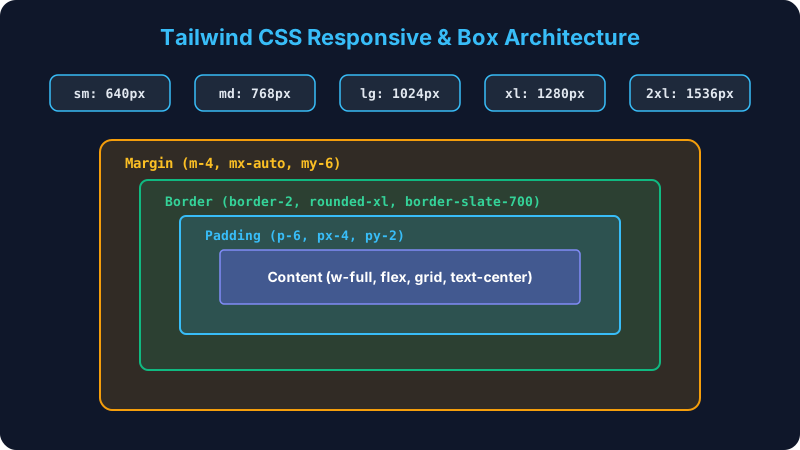 Click to Zoom
Multiple Choice Questions
style="color: red;") and Tailwind CSS (class="text-red-500")?Installation via PostCSS, Vite & Next.js Framework Integration
Continue learning with hands-on practice, examples, and exercises in the upcoming topic.
Related Lessons
| Previous Lesson | Next Lesson |
|---|---|
| None | Installation via PostCSS, Vite & Next.js Framework Integration |
Practice Quiz
Test your understanding of this lesson with 5 questions. Each question has one correct answer.